
Using your own API keys
Paraplex's AI features run on services like Anthropic (the assistant) and ElevenLabs (voices). Add your own key for a service, and what it makes is billed to your account there instead of spending Paraplex credits. Your keys stay in your browser.
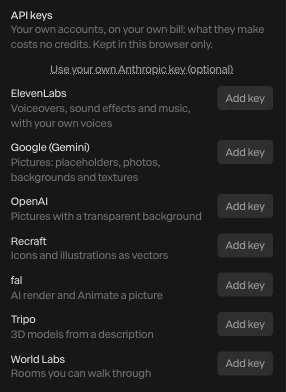
Add a key
- Click your email at the right of the top bar to open your account window. Not signed in? Click Sign in: the Anthropic key field is there too.
Under API keys:
- For the assistant, click Use your own Anthropic key (optional).
- For another service, click Add key beside it. The services other than ElevenLabs are under Add more keys.
- Paste the key from the service's own site (Get a key ↗ links to it), and click Save key.
Paraplex checks each key with its service when you save it, and says if the service turns it down. A saved key shows as "Using your own … key: no credits", with Remove.
| Service | What it runs |
|---|---|
| Anthropic | The assistant |
| ElevenLabs | Voiceovers, sound effects and music, with your own voices |
| Google (Gemini) | Pictures: placeholders, photos, backgrounds and textures |
| OpenAI | Pictures with a transparent background |
| Recraft | Icons and illustrations, as vectors |
| fal | Render with AI and Animate a picture |
| Tripo | 3D models from a description |
| World Labs | Rooms you can walk through |
Where your keys go
- Keys are kept in this browser only. They're never saved in your projects, share links or copies, and never uploaded to your account. Add them again in another browser.
- With your Anthropic key, the assistant talks to Anthropic straight from your browser: Paraplex never sees the key or what you ask.
- Other keys pass through Paraplex for each job, to reach the service, and aren't stored or logged.
Things to know
- Jobs on your own key cost no credits, so a job that fails isn't refunded: that's between you and the service.
- A room or an AI render started on your key can only be fetched with it, so keep the key until the result lands.
- To go back to credits, click Remove beside the key.
See AI credits and keys for what each feature costs in credits.