
Effect library
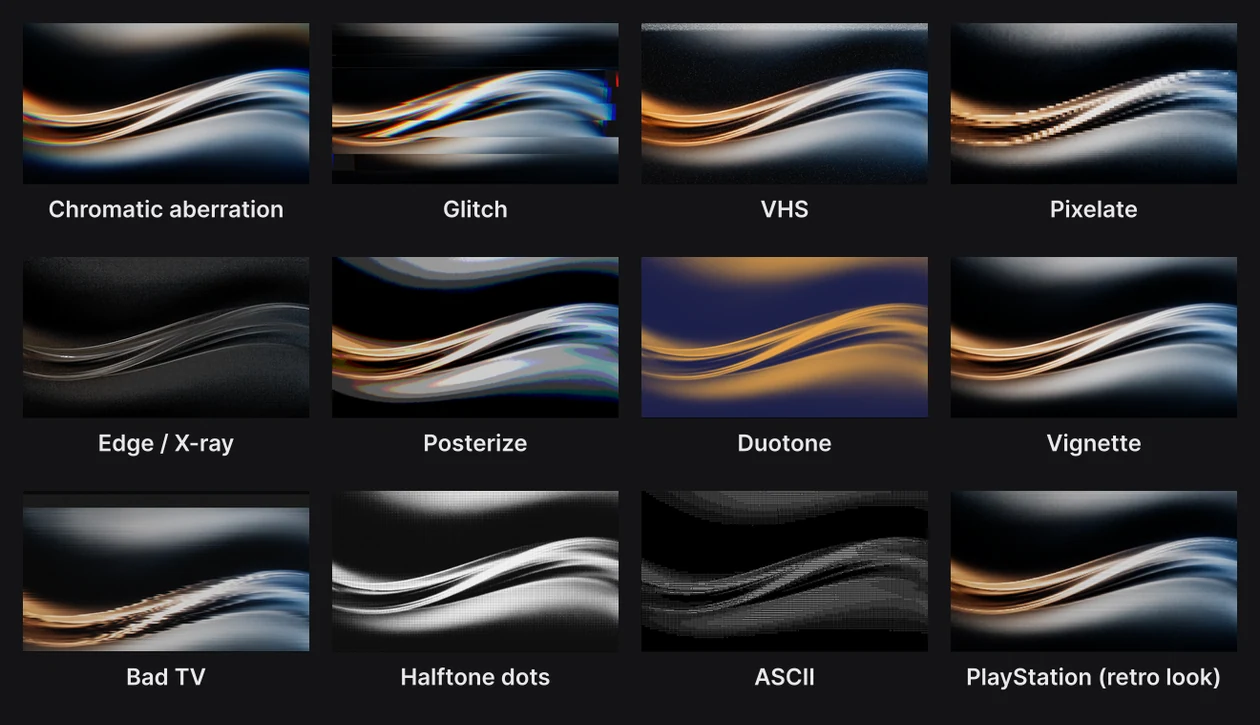
The effect library holds 26 effects and two retro looks that run over the finished frame: a lens's color fringe, a glitch, tape noise, a halftone screen, a picture made of letters. Stack as many as you like, animate their dials, or write your own.
Where to find it: Lens passes in the Filters section, with Scene selected at the top of the Layers panel.
Add an effect
- Click Scene at the top of the Layers panel.
- In the Filters section, open Effects… beside Lens passes and pick one.
- Set its dials.
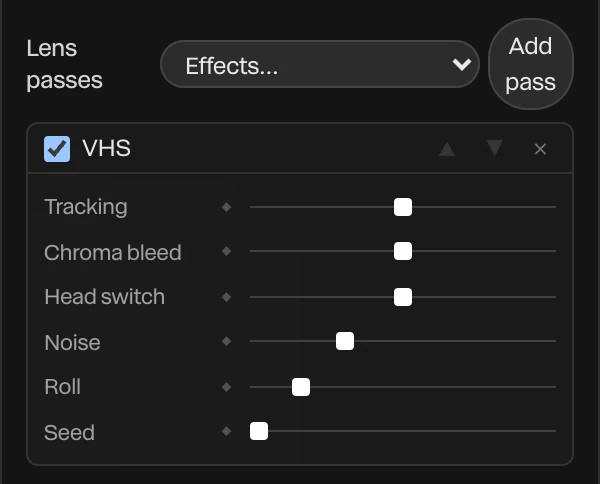
Effects run in order, top to bottom. Move one with the arrows, turn it off with its checkbox, or remove it with ×. Every dial has a ◆, so an effect can build, flicker or fade over time. See Animation basics.
To put an effect on one layer only, use the layer's Layer Filters instead. See Layer effects.
The effects
| Effect | What it does |
|---|---|
| Chromatic aberration | Splits the colors outward from a center, most at the edges, like a cheap lens |
| Glitch | Rows slide, lines tear and the colors come apart, in bursts on a rhythm |
| VHS | Tape noise rolling up the frame, color bleeding sideways, and the band at the bottom of a worn tape |
| Pixelate | The frame in square blocks of a size you choose |
| Edge / X-ray | Draws the edges of everything. Invert it for an X-ray. |
| Afterimage | What moves leaves a fading trail behind it |
| Posterize | Each color held to a few flat levels |
| Duotone | The frame in two colors, one for the darks and one for the lights |
| LUT (.cube) | A color grade from a .cube file, the kind colorists and camera makers share. Load the file on the effect. |
| Vignette | Darkens the frame toward its edges |
| Loupe | A Liquid glass disc that enlarges and bends what's under it |
| Ripple | Rings spread from a center and bend the picture as they pass |
| Dissolve | The picture crumbles away into grain. Keyframe its amount from 0 to 1 to dissolve out. |
| RGB shift | The three colors slide apart, like a misprint |
| Bad TV | A set that can't hold its picture: rolling, tearing, snow and wandering color |
| Halftone dots | The picture as a screen of dots, like a newspaper |
| ASCII | The picture drawn in letters and symbols, picked for its shapes and tones |
| Directional blur | A blur in one direction, for speed and motion |
| Wave, Bulge, Twirl, Skew | Bend the picture: in waves, swelling from a center, twisting round it, or slanted |
| Jelly | Wobbles a picture like jelly while it moves, and settles when it stops. It's made for a moving layer, so it suits a layer's Layer Filters best. |
| Datamosh | At a cut, the last shot's picture smears along with the next shot's motion, then gives way. Key its Mosh to 1 at the cut and back to 0. |
| Cursor lens | A round magnifier that rides a cursor along its route |
| Fluid reveal | Shows the frame only along a cursor's recent trail. See Layer effects. |
Retro looks
PlayStation and Nintendo 64, at the bottom of Effects…, turn the frame into an old games console's picture: big pixels, few colors, a dither pattern and scanlines. Their dials are Pixel (the pixel size), Levels (how many colors), Dither, Scanline, and Wobble, which makes 3D shapes jitter the way they did on the first PlayStation.
A loupe or a cursor lens
Loupe and Cursor lens are effects with a place. Their Follows setting chooses what they follow: their own center dials, the viewer's pointer in Preview, a cursor or any other layer.
- Cursor lens rides a cursor along its route, enlarging what's under it, with the colors parting toward its rim and trailing behind a fast move. Added to a scene with a cursor, it follows that cursor straight away. See UI overlays and cursors.
- Loupe set to follow the pointer in Preview lets whoever is watching look closer.
Tip
A cursor lens with its radius at 0 shows nothing. Keyframe the radius up from 0 to grow the lens in when the cursor arrives.
Write your own
Click Add pass beside Effects… for an effect of your own. It opens in the Shader panel, where you write it as a shader that reads the finished frame. Click any effect's name to open its code there.
It runs after the color grade, on the colors you see, so a shader pasted from Shadertoy works the way it did there. See Shader fills.