
Generators
A generator is a layer whose shape comes from a small program: thousands of stars in spiral arms, a city of blocks, rolling terrain, a field of grass in the wind. Paraplex comes with five, each with settings you can animate. You can change their code, write your own, or ask the assistant to.

Add a generator
Click Generator in the dock for a Galaxy. Press and hold it to choose a starter:
| Starter | What it builds | Its settings |
|---|---|---|
| Galaxy | Stars in spiral arms, turning slowly | Stars, Arms, Twist, Radius, Spin, Core and Rim colors |
| City blocks | A grid of buildings of varied heights | Blocks, Height, Streets, Rise, Color |
| Terrain | Rolling hills of columns, drifting | Resolution, Scale, Height, Drift, Low and High colors |
| Grass | Blades swaying in the wind | Blades, Wind, Height, Color |
| Orbits | Spheres circling on rings | Rings, Per ring, Speed, Color, Paths |
City, terrain and grass lie flat, like the ground. Tip them toward the camera with Rotation X to see their tops.
The Generator panel
Select a generator and its panel opens above the dock.
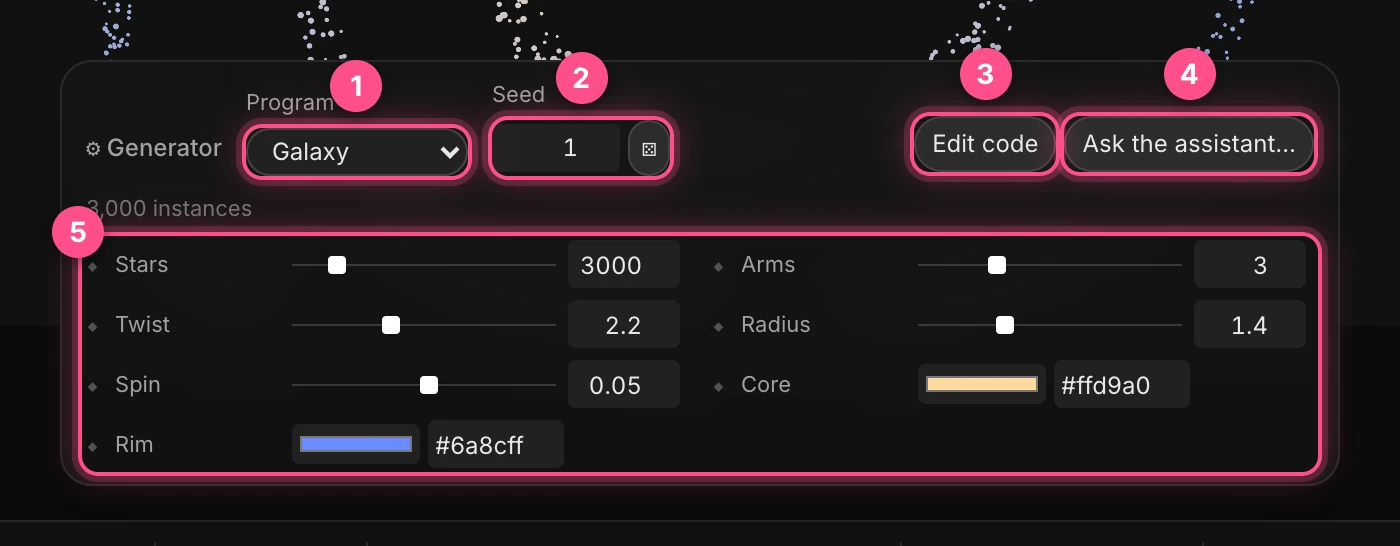
- Program: which starter it runs. Choosing another one replaces the code, so save any changes of your own first.
- Seed: a different random version of the same program. The dice button rolls a new one.
- Edit code opens the program's code.
- Ask the assistant… starts a message to the assistant to change the generator for you, like "make the arms thicker" or "add a second color".
- The program's settings. Each has a diamond, so you can animate it: a galaxy that unwinds, a city that rises.
The line under the program shows how many things it drew.
Change the code
Click Edit code to see the program.
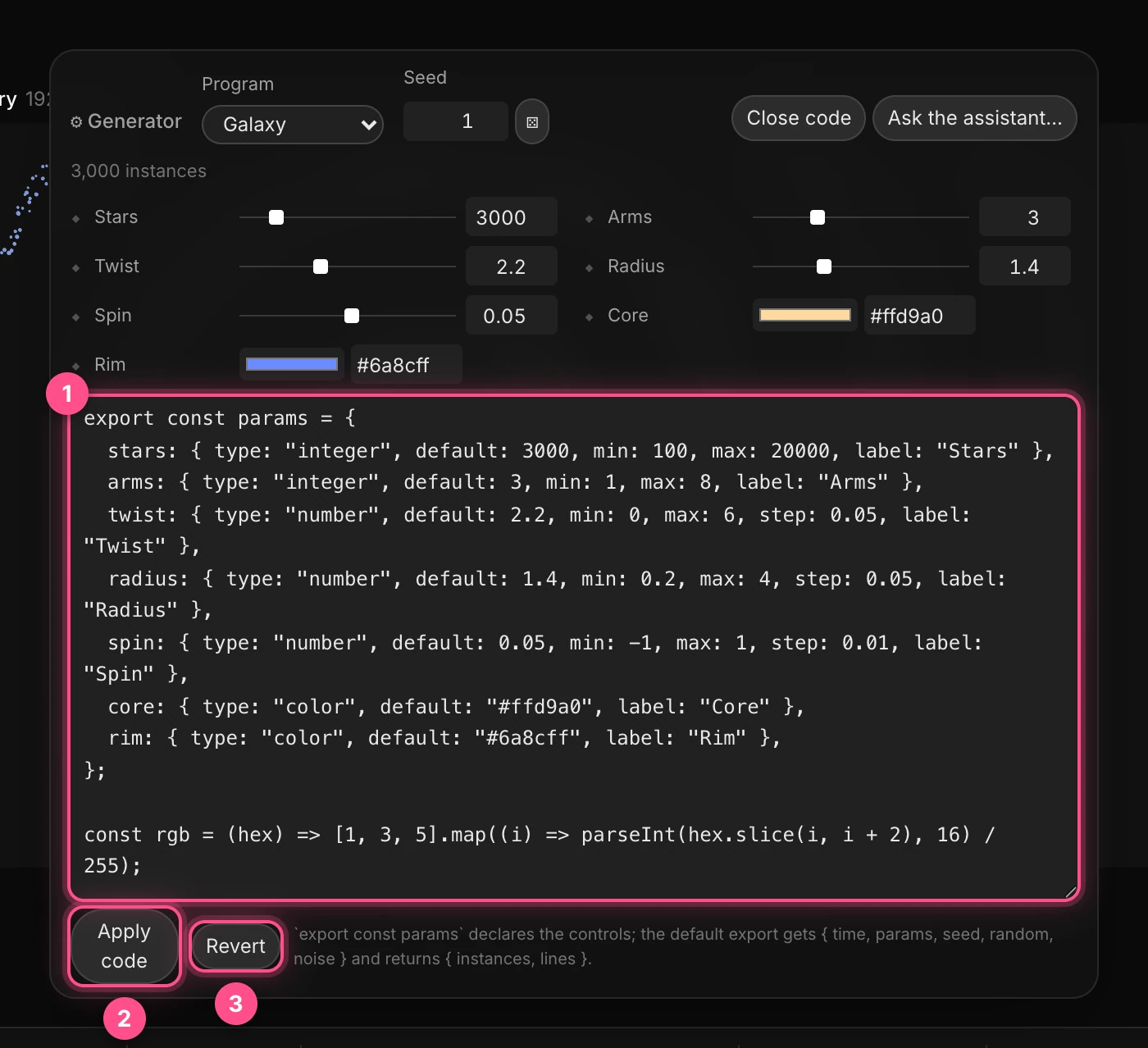
- The code. Edit it right here.
- Apply code runs your changes (⌘ Cmd+Enter).
- Revert goes back to the code as it was.
If the new code has a mistake, the layer draws nothing and the error shows under the program. Close code throws away changes you haven't applied.
How a program works
A program has two parts:
export const paramslists the settings, each with a type (number, integer, color, choice or true/false), a default and a range. Each one becomes a control in the panel.- A default function gets the time, the settings, the seed and helpers for random numbers and noise, and returns what to draw: many copies of one shape (a box, sphere, card, dot, cylinder or cone), each with its own position, size, rotation and color, plus optional lines.
export const params = {
  count: { type: "integer", default: 200, min: 10, max: 2000, label: "Count" },
};

export default function generate({ time, params, random }) {
  const positions = [];

  for (let i = 0; i < params.count; i += 1) {
    // x, y and z for each sphere, one after another.
    positions.push(random() * 3 - 1.5, Math.sin(time + i) * 0.3, random() - 0.5);
  }

  return { instances: { shape: "sphere", positions } };
}
A program can draw up to 20,000 copies and 100,000 line segments, and must finish within 6 seconds. It runs walled off from the rest of the app.
Tip
The easiest way to get a program of your own is to describe it to the assistant: "a spiral staircase of cards", "rain falling on a grid". It writes the code, tests it, and adds the settings as controls.