
AI credits and keys
The assistant and the generate tools run on AI services that cost money, so they spend credits from your plan. One credit is one US cent of AI use. You can also use your own account at each service, with your own API key, and then they cost no credits at all.
Where to find it: your balance in the top bar, and API keys in your account window: click your email at the right of the top bar.
What costs credits
Every generate tool shows its price in the dialog before you start.
| What you make | Credits |
|---|---|
| A picture: placeholder or texture | 8 |
| A picture: photo or background | 12 |
| A transparent overlay | 2 |
| A vector icon | 9 |
| A 3D model | about 33 |
| A room: Draft, Standard, Large | 28, 165, 330 |
| Render with AI, per 5 seconds: Draft, Standard, Best 720p, Best 1080p | 44, 98, 128, 248 |
| Animate a picture, per 5 seconds: Draft, Standard, Best 720p, Best 1080p | 39, 62, 168, 376 |
| A voiceover, per 1,000 characters | about 9 with Expressive, 4 with Flash |
| Music, per minute | about 17 |
An assistant turn costs what it actually used, which depends on the model and how much the assistant did. Ten-second renders and animations cost twice the five-second price.
Everything else in Paraplex is free: building, animating, effects, Studio render and exporting don't use credits.
When credits are spent
- Pictures, voices and sound: when they're made.
- 3D models, rooms, AI renders and animated pictures: when the job starts. If it fails, the credits are given back.
- The assistant: after each turn, for what it used.
If you run out, the dialog or the assistant offers Upgrade. See Plans and credits for monthly credits, extra credits and invites.
Use your own API keys
With your own key for a service, everything that service makes runs on your account and bill, and costs no credits.
- Click your email at the right of the top bar to open your account window.
Under API keys, find the service:
- For the assistant, click Use your own Anthropic key (optional).
- ElevenLabs is always listed. Click Add more keys to show the others.
- Except for Anthropic, click Add key beside the service.
- Paste the key from that service's own site, and click Save key.
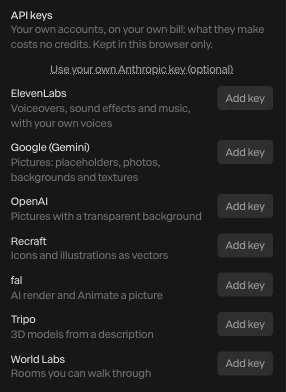
| Service | What it makes |
|---|---|
| Anthropic | The assistant |
| ElevenLabs | Voiceovers, sound effects and music, with your own voices |
| fal | Render with AI and Animate a picture |
| Google (Gemini) | Pictures: placeholders, photos, backgrounds and textures |
| OpenAI | Pictures with a transparent background |
| Recraft | Icons and illustrations, as vectors |
| Tripo | 3D models from a description |
| World Labs | Rooms you can walk through |
Paraplex checks each key with its service when you save it, and doesn't keep one the service refuses. Your keys are kept in this browser only, and never uploaded to Paraplex. Add them again in another browser.
Note
A job on your own key that fails is between you and the service: no credits were taken, so none are given back.