
Generate 3D models
Describe an object, and Paraplex builds a 3D model of it with AI: a vase, a chair, a figurine, a plant. It arrives as an ordinary model layer you can light, turn, animate and export.
Where to find it: Generate 3D model in the quick-actions strip, or press and hold the dock's 3D model button and choose Generate from text….
Make a model
- Open Generate 3D model.
- Describe the object: what it is, its shape, its material and color.
- Click Generate, or press ⌘ Enter.
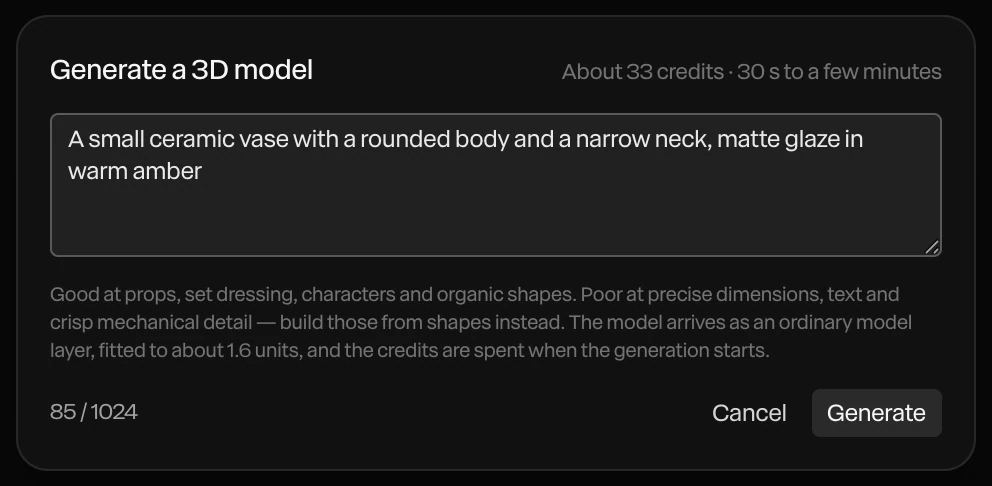
The top of the dialog shows about what it costs and how long it takes: 30 seconds to a few minutes.
The model arrives as a new layer, about 1.6 units across, and selected. It's also saved under Your models in the library, so you can use it in other projects. See 3D models and splats.
What it's good at
- Good at: props, set dressing, characters and organic shapes.
- Poor at: exact sizes, text and crisp mechanical detail. Build those from shapes, text and paths instead.
Tip
Describe one object, plainly: "a small ceramic vase with a rounded body and a narrow neck, matte amber glaze". A whole scene in one description comes out muddled. Make the pieces one at a time and arrange them.
Credits
The credits are spent when the generation starts. If it fails, they're given back. With your own Tripo API key, a model costs no credits. See AI credits and keys.
Closing the dialog while a model is being made abandons it.