
Exporting video
When your piece is ready, export it as a video file to post, send or put on a website. Paraplex renders every frame on your computer, at full quality, whatever your canvas showed while you worked.
Export a video
- Choose a format in the Scene's Video Export section (click Scene in the Layers panel, and scroll to the bottom of its settings).
- Click Export Video at the foot of the properties panel. Or choose Menu › Export video.
- A thin bar above the buttons shows how far it has got. The file downloads when it's done.
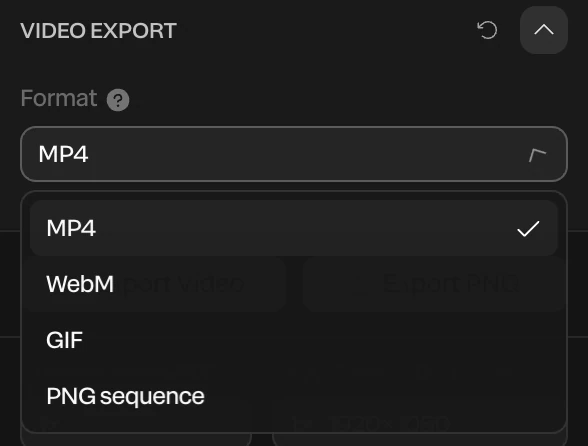
Formats
| Format | What you get | Use it for |
|---|---|---|
| MP4 | H.264 video with AAC sound | The default. Plays everywhere: social, slides, email, websites. |
| WebM | VP9 video with Opus sound | Smaller files for websites, and the only video that can be see-through. See Transparent video. |
| GIF | An animated GIF, up to 640 pixels on its long side, with no sound | Chat, docs and anywhere video won't play |
| PNG sequence | A .zip of one PNG per frame | Editing apps like After Effects or Premiere, at full quality. Can be see-through. |
Files are named after their size, such as paraplex-1920x1080.mp4.
Size, length and frame rate
- Size: your canvas size, times Export resolution scale at the foot of the panel. See Exporting images.
- Length: the whole timeline, up to 5 minutes. An artboard with a range of its own exports just that stretch. See The timeline.
- Frame rate: set it with the fps button in the timeline's header. The video is written at exactly that rate.
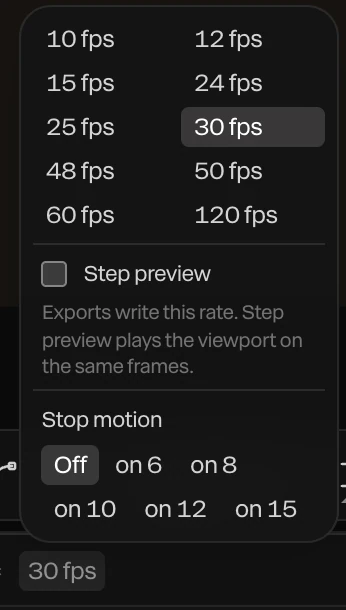
| Frame rate | Good for |
|---|---|
| 24 or 25 | A film look |
| 30 | Social video, the default |
| 60 | Smooth UI motion and fast camera moves |
See Speed ramps and frame rate for Step preview and Stop motion.
Sound
Every sound on the timeline is mixed into an MP4 or a WebM, with its volume and fades. GIF and PNG sequences have no sound. See Audio.
How long it takes
Every frame is rendered on its own, so the time grows with the length, the frame rate and the size: a 10-second piece at 60 fps is 600 frames. Studio render traces every frame at its chosen samples, which takes much longer. Keep the tab open while it works: there is no Cancel for a single export.
When a size won't encode
Some browsers can't encode very large MP4s. If yours can't, Paraplex exports at the biggest size it can and tells you, and suggests WebM when that would make the full size. If the browser can't write the chosen format at all, it uses the other one and says so. See Export troubleshooting.
On the Free plan
Free exports video up to 1920 × 1080 and 30 fps, with no watermark. Bigger sizes, higher frame rates, transparent video and PNG sequences are part of Pro; asking for one offers to Export at 1080p, 30 fps instead. GIFs aren't limited. See Plans and credits.