From Figma frame to finished motion.
Select frames in Figma, copy them with the free Send to Paraplex plugin, and paste them into Paraplex. Groups, auto layout, vectors, text and Figma's Glass effect arrive as layers you can edit, then you add depth, real light, keyframes and camera moves and export MP4, transparent video, GIF, Lottie or a live embed.
Free plugin. No account needed. Nothing leaves your computer until you paste.










The design already exists in Figma. Turning it into motion usually means rebuilding it, layer by layer, in another tool. Send to Paraplex skips the rebuild: the frames you select arrive as the same layers, nested the same way, ready for depth, light and keyframes in a real 3D scene.
Comparing tools first? Read Paraplex vs Figma Motion.
Animate in Figma, or send it to Paraplex?
Paraplex
Send it to Paraplex when you want
Real 3D depth, with glass, chrome and metal in real light
Camera moves through the scene
One piece cut for 16:9, 9:16, 1:1 and 4:5
Voiceover, music, sound and animated charts in the same file
Transparent video, Lottie or a live embed for your site
Figma Motion
Staying in Figma is plenty when you want
UI motion that lives next to the design
Prototype transitions for a product team
Flat 2D motion (as of October 2026, Figma lists 3D transforms as coming soon)
No second tool to open
Both
Most teams use both. Design and prototype in Figma, then send the frames across when a launch video, a social cut or a website hero needs 3D, light and a finished file.
From Figma to Paraplex in three steps.
No Paraplex account needed to paste and animate. Sign in when you want to save your work and pick it up on another device.
01
Select your frames in Figma.
Install Send to Paraplex from Figma Community. Select one or more frames on the canvas, then run the plugin from the Plugins menu.
Get the plugin02
Click Copy for Paraplex.
The plugin reads the selection and readies it on your computer. It makes no network requests, so your design goes nowhere until you paste it.
What comes across03
Paste into Paraplex.
Open app.paraplex.ai, click the canvas and paste (⌘V, or Ctrl+V on Windows). The frames land as nested layers, and a message lists anything that came across differently.
Open ParaplexFigma Glass becomes real glass.
Figma's Glass effect arrives as Paraplex's Liquid glass, and background blur becomes a frosted lens. In Paraplex the glass sits in a lit 3D scene: it bends and magnifies what's behind it, splits light at its edges, and each of its dials can be keyframed.
Give the rest of the frame depth and a material too, put the camera on a move, and the glass catches the light as it turns.
See every dial on liquid glass.
Bring the design system with it.
Export your Figma variables as a W3C design token file, the format common Figma variable exports produce, and import it in Paraplex. The tokens go into one project's palette or into a design system for every project; aliases stay live, and color references keep linking to layers.
From there, restyle any scene onto the system in one step, and switch its light and dark themes.
More on design systems.
What comes across.
After each paste, a message lists anything that came across differently, such as masks, per-side stroke weights, diamond gradients and some shadows, so nothing changes without you knowing.
Frames
One frame or several, one paste.
Select as many frames as you like. Each arrives on the canvas with its layers nested as they were in Figma.
Pictures
Sharper than you drew them.
Pictures come in at three times their drawn size, up to 2,048 px, so they hold up when the camera moves in.
Auto layout
Lists stay live.
Auto layout lists keep working after the paste, so the list still lays itself out in Paraplex.
Shapes
Fills, corners and shadows.
Rectangles and ellipses keep their fills, gradients, pictures, corners, strokes and shadows.
Groups
Nested as in Figma.
Groups keep their nesting, so the Layers panel reads the way your Figma file does.
Glass
Figma Glass, made real.
Figma's Glass effect becomes Paraplex's Liquid glass, and background blur becomes a frosted lens.
Text
Still type, in your fonts.
Text arrives as live text in your fonts, or the nearest bundled face, so you can still edit the words and animate them.
Vectors
Editable paths.
Vectors become paths you can reshape, then give depth, a material and motion.
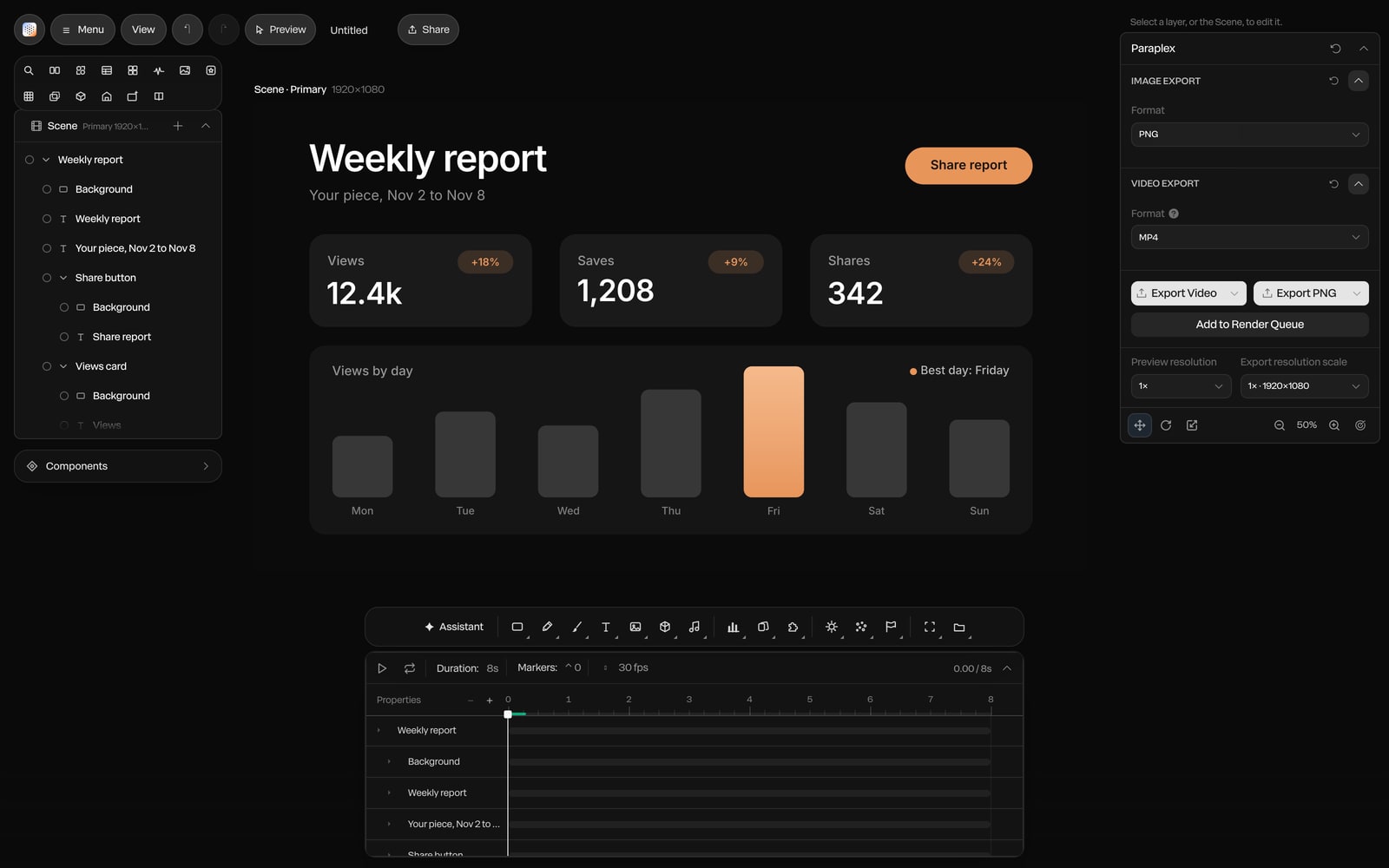
It lands as your file, not a picture of it.
Here a weekly report dashboard has just been pasted from Figma. Every frame, label and number came across as its own layer, nested as it was, so you can select one line of text and animate just that.
From here, give the cards depth and a material, light the scene, and keyframe the numbers in.

Screenshot · a Figma frame pasted into Paraplex
What you need, and the limits.
A free plugin, a browser tab and a paste. An account is optional until you want to save your work.
3×
the drawn size pictures import at, up to 2,048 px
0
network requests from the plugin: nothing leaves until you paste
What you need
Figma, with Send to Paraplex from Figma Community
Paraplex open in your browser at app.paraplex.ai
No account to paste and animate; one to save your work
Plans and limits
Send to Paraplex: free
Paraplex Free: 1080p exports, no watermark, transparent video included
Pro: 4K at 60 fps, batch export and Studio render
An account keeps projects, design systems, components, templates and assets across devices and browsers
Good to know
Text uses your fonts, or the nearest bundled face
Masks, per-side stroke weights, diamond gradients and some shadows can come across differently, and the import message lists them
Figma variables come across separately, as W3C design tokens
Paste with ⌘V on a Mac or Ctrl+V on Windows
Questions about Figma to Paraplex
How do I turn a Figma design into an animation?
Install the free Send to Paraplex plugin from Figma Community, select the frames you want, run the plugin and click Copy for Paraplex. Then open Paraplex in your browser, click the canvas and paste. The frames arrive as editable layers, ready for depth, light, keyframes and camera moves, and you export MP4, transparent video, GIF, Lottie or a live embed.
Is Send to Paraplex free, and do I need an account?
The plugin is completely free, and you don't need a Paraplex account to paste and animate. An account lets you save design systems, come back to projects and templates on any device or browser, and save and publish your own components, templates, assets and plugins. Paraplex is free to start, with 1080p exports and no watermark.
Does auto layout survive the paste?
Yes. Auto layout lists stay live after the paste, and groups stay nested as they were in Figma, so the Layers panel reads like your file.
What doesn't come across exactly?
Groups, rectangles, ellipses, vectors, text and Figma's Glass effect all come across. After each paste, a message lists anything that came across differently, such as masks, per-side stroke weights, diamond gradients and some shadows. Text uses your fonts, or the nearest bundled face if a font isn't available.
Is my design sent anywhere?
No. The plugin makes no network requests. Your design stays on your computer until you paste it into Paraplex yourself.
Can I bring my Figma variables and styles?
Yes, as design tokens. Export your variables as a W3C design token file, the format common Figma variable exports produce, then choose Import tokens in Paraplex. The tokens can go into one project's palette or be saved as a design system for every project, and aliases stay live.
Should I use Figma Motion or Paraplex?
Use Figma Motion for UI motion and prototypes that stay inside your Figma file; as of October 2026 it's 2D, with 3D transforms listed as coming soon. Use Paraplex when the piece needs real 3D depth, glass and light, camera moves, voiceover or music, and finished video in every aspect ratio. Many teams design in Figma and send the frames to Paraplex for the final piece.
What to do with it once it's in Paraplex
Send your first frame.
Install the free plugin, copy a frame, paste it into Paraplex and make it move.
Paraplex is a browser-based 3D motion design studio with an AI assistant that edits real layers and keyframes.