
Articles, Guides, Roundups
Start in Claude Code, finish in Paraplex.
Claude can write a whole launch video now. Paraplex is where you see what it made, steer it and finish it. Add the Paraplex MCP server to Claude Code, connect it to your open Paraplex tab, and every scene Claude builds arrives as real layers, keyframes, lights and camera moves you can edit by hand.
Unlimited free 1080p exports. No watermark. Runs in your browser.
> a 10-second launch video with three glass cards and our logo Open app.paraplex.ai, then Menu › Connect an agent, and enter the port and six-digit code. connection · scene · run_tool build_scene · set_keyframes · add_camera_move frames · export_video → ./paraplex-exports
Since Claude Opus 5.5 arrived in September 2026, one prompt can become a launch video, a showreel or an explainer. Claude gets there by writing code that draws every frame, and what usually comes back is a render or a folder of code: a black box. To change one word, you prompt and render again. Paraplex opens the box. Every element Claude makes is a layer you can see, every timing is a keyframe you can drag, and the light, glass and camera are yours to direct.
Claude on its own, or Claude with Paraplex?
Claude + Paraplex
Connect Paraplex when you want
Every element as a layer you can see, select and move
Keyframes, lights and camera moves you can retime by hand
Real 3D glass, chrome and light, lit like a studio
One scene in every aspect ratio, or as a live web embed
Every edit visible as it lands, one undo step each
Claude on its own
Claude alone is plenty when you want
A finished render from one detailed prompt
Motion as code you're happy to edit in code
A one-off piece you won't need to change
Nothing between you and the file
Both
Claude does the thinking either way: the brief, the script, the code. Paraplex's built-in assistant lets you pick the Claude model it uses, or add your own Anthropic API key.
Set it up in three steps.
Install the server once. Each time you want Claude in the editor, connect it from your Paraplex tab.
01
Add the server to Claude Code.
In your terminal, run claude mcp add paraplex -- npx -y paraplex-mcp. You need Node for npx. The server listens on port 47821; to use another, start it as npx paraplex-mcp 48000.
paraplex-mcp on npm02
Open Paraplex.
Open app.paraplex.ai in Chrome, Edge or Arc. If the browser asks to let the page connect to devices on your local network, allow it: that's the server.
Open Paraplex03
Ask Claude, then connect.
Ask Claude Code for a piece, such as a 10-second launch video with three glass cards and your logo. It gives you a port and a six-digit code; enter them in Menu › Connect an agent. A banner shows while it's connected.
How agents work in ParaplexA glass box, not a black box.
Nothing Claude does happens out of sight. Each edit appears in your tab as it lands, a banner shows while Claude is connected, and every edit is one undo step, so you can step back through anything it did.
What it leaves you is a project, not a render: layers you can rename and regroup, keyframes you can drag, materials you can swap, and lights and camera moves you can retime. Change one word and nothing else has to be rebuilt. Fix it by hand, ask Paraplex's own assistant, or hand it back to Claude.
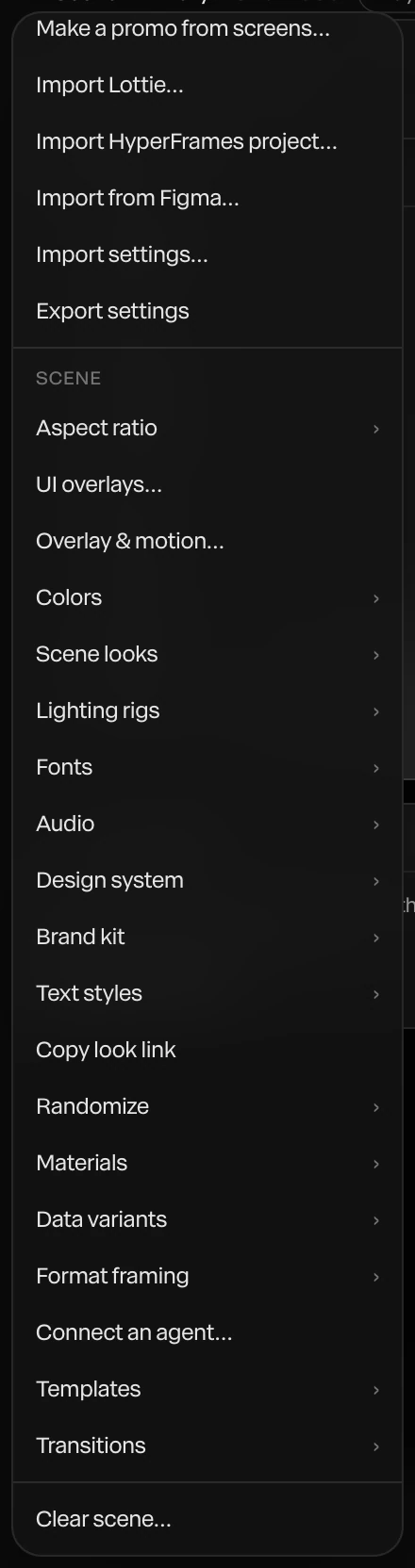
Screenshot · Menu › Connect an agent
Built to plug into each other.
Claude is good at the parts made of words and logic: the brief, the script, the structure of a scene, the code. Paraplex is good at the parts you judge with your eyes: a real 3D renderer, physically based glass and light, a keyframe timeline, and export for every screen. The Paraplex MCP server joins the two, so Claude works with the same 140+ tools as the Paraplex editor instead of guessing at pixels.
Claude doesn't start from zero. The MCP repo includes a Paraplex agent skill that teaches it how Paraplex works, and Claude can look at its own frames as it builds. When code is the faster route, it can write a HyperFrames project and bring it in as a code layer that plays on the timeline and exports frame for frame.
The same pairing runs through all of Paraplex. The built-in AI assistant lets you pick the Claude model it uses, AI motion design explains the glass-box idea behind both, and AI agents covers the full MCP toolset.
connection — is a tab attached; if not, the port and code scene — canvas, duration, time, every layer scene_facts — where each layer lands, type sizes, the camera list_tools, run_tool — the assistant's verbs list_templates, apply_template, new_project — start a piece set_time, frame, frames, export_png — look at any moment export_video — a video file on this computer import_hyperframes — a HyperFrames project as one code layer save_project — the scene, saved in your browser
Build a tool, or open the studio.
Claude has turned a lot of designers into toolmakers. Design Twitter is full of small apps built in a weekend for one project's exact needs, and sometimes one of those is all a job needs. When the jobs keep changing, Paraplex is one motion design studio for all of them, and it sits beside the tools you already use instead of replacing them.
Social
Shorts, Reels and TikToks.
Vertical cuts with ElevenLabs voices, captions timed to every word, and safe zones that keep text clear of each app's buttons.
Launch
Launch and product videos.
Your real screens on a 3D phone or in a browser, a cursor that clicks through the flow, and one scene exported for every channel.
Web
Live web embeds.
Publish a snippet that plays in real time on any website and answers hover, click, drag and scroll.
Data
Charts from your numbers.
Paste a CSV and get bar, line, donut or scatter charts that build themselves, with every bar and label a layer.
At scale
A version for every customer.
Data variants make one version per spreadsheet row, with a name, a price or a photo matched to layers, for product and sales videos. On Pro, Export all variants renders them all.
Brand
Logo reveals and showreels.
Your SVG logo in chrome, glass or particles, lit like a studio, and reels cut to the beat with Detect beats.
Learn
Explainers and lessons.
Kinetic type, a whiteboard explainer template, and narration with word-timed captions, for pieces up to 60 seconds.
Code
HTML, React and GSAP to video.
Paste a component, or let Claude write one. It plays on the timeline's clock, and Lift into layers turns it into Paraplex layers.
What you need, and what stays private.
The server runs on your computer and talks only to your Paraplex tab. The scene stays in the tab, exports are written to your computer, and the code is open source under the MIT license.
140+
tools from the Paraplex editor itself; your agent works through the same set
1
undo step per edit, so you can step back through anything your agent did
What it can do
Read the scene and where every layer lands
Build with the 140+ tools of the Paraplex editor
Turn your numbers into animated charts
Start from a template or a blank file
Look at any moment as the export draws it
Export video and PNG stills to your computer
Privacy and safety
Listens on this computer only
Only a Paraplex page can connect, with a one-time code
Nothing is sent anywhere else
A banner shows while connected; disconnect any time
What you need
Claude Code, or any MCP client
Node, to run npx
Chrome, Edge or Arc, with local network access allowed
Paraplex open at app.paraplex.ai
Questions about Claude Code and Paraplex
How do I connect Claude Code to Paraplex?
Run claude mcp add paraplex -- npx -y paraplex-mcp in your terminal. Open app.paraplex.ai in Chrome, Edge or Arc and ask Claude Code for a piece. Then choose Menu › Connect an agent and enter the port and six-digit code it gives you. A banner shows in the tab while it's connected.
What is the Paraplex MCP server?
paraplex-mcp is an open-source MCP server, MIT licensed, that connects Claude Code or any MCP client to the Paraplex tab you have open. Your agent can then build and change scenes with the same 140+ tools as the Paraplex editor, look at frames as it goes, and export. The repo also includes a Paraplex agent skill that teaches your agent how Paraplex works.
How is Paraplex different from making motion with Claude alone?
On its own, Claude usually writes code that renders a video, so what comes back is a file or a folder of code, and a change means another prompt and another render. Connected to Paraplex, Claude builds the piece as layers, keyframes, lights and camera moves in a real 3D scene, and you can see, select and change any of it by hand before you export it for every screen.
How does Paraplex compare with Claude Motion?
Claude Motion, in beta on Claude's Team and Enterprise plans since October 8, 2026, turns reports, charts and text into short animated explainers you export as MP4. Paraplex is a full motion design studio, with real 3D materials and light, a keyframe timeline, every aspect ratio and live web embeds, and Claude Code can work inside it through the MCP server.
Is my project sent anywhere?
No. The server listens on your computer only, and only a Paraplex page can connect, with the one-time code. The scene stays in your tab, and exports are written to your computer, in ./paraplex-exports or the folder PARAPLEX_OUT_DIR names.
Does it use my Paraplex AI credits?
AI used inside Paraplex is metered by your Paraplex plan as usual. Claude Code's own work runs on your Claude account, not on Paraplex credits.
The connection isn't working. What should I check?
Use Chrome, Edge or Arc, and allow the page to connect to devices on your local network when the browser asks. Then check that the port and code match what Claude Code gave you. The server uses port 47821 unless you started it on another, such as npx paraplex-mcp 48000.
Where do exports go?
export_video writes the finished video to ./paraplex-exports on your computer, or to the folder PARAPLEX_OUT_DIR names. save_project keeps the scene as a Paraplex project in your browser, ready to open and keep editing.
Start in Claude Code. Finish in Paraplex.
One command to install, one code to connect, and every layer Claude builds is yours to keep.
Paraplex is a browser-based 3D motion design studio with an AI assistant that edits real layers and keyframes.