A free Screen Studio alternative for any computer.

Screen Studio is the most polished screen recorder on a Mac. Paraplex records your screen in any browser, on Windows, macOS, Linux or a Chromebook, and drops the recording into a 3D motion editor: zooms you can retime, a device in real light, titles, a voice and every aspect ratio, with free 1080p exports and no watermark.

Unlimited free 1080p exports.  No watermark.  Runs in your browser.

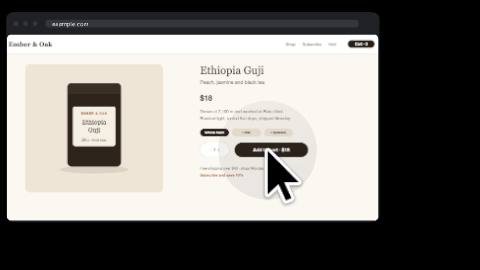
Click-through demo template made in Paraplex: a pointer types a web address into a browser frame and walks through a shop's pages while the camera pushes in on every click

The short version.

Paraplex

Choose Paraplex if you need

A screen recorder that runs in any browser, on Windows, macOS, Linux or ChromeOS, with nothing to install

A free plan with 1080p exports and no watermark

Zooms that land as keyframes you can move, retime and ease

Your recording on a 3D phone, laptop or browser window, with titles, an animated cursor and a voice

One scene reframed for 16:9, 9:16, 1:1, 4:5 and 4:3, or published as a live embed

Screen Studio

Choose Screen Studio if you need

The most polished recording you can make on a Mac, with almost no editing

Your webcam on screen, with split layouts and a camera cutout that removes your background

Long takes in one recording, and iPhone or iPad capture over USB

Editing by transcript, with filler words and long pauses found for you

Privacy masks that hide sensitive data and faces

Both

Automatic zoom, MP4 export up to 4K at 60 fps, GIF export, 16:9, 9:16 and 1:1 formats, captions, AI voiceover, background music, and share links with comments.

Three differences that change how you work.

Screen Studio makes a recording look its best. These are the places where Paraplex takes a recording further, or works where Screen Studio doesn't.

01

Any computer, any browser, free.

As of November 2026, Screen Studio is a Mac app built for Apple silicon, and its maker says there are no near-future plans for a Windows version. It's sold as a subscription, $9 a month billed yearly or $29 month to month, with no free plan, and one-time licenses are no longer sold.

Paraplex records a screen, a window or a tab in the browser you already use, on Windows, macOS, Linux or ChromeOS, with nothing to install. Record screen is on the free plan, and free exports go up to 1080p with no watermark.

Paraplex

Any browser, any OS; free plan with 1080p exports and no watermark

Screen Studio

Mac only (Apple silicon); $9 a month billed yearly or $29 month to month

02

Zooms you can retime, in a scene you can light.

Screen Studio adds zooms, a smoothed cursor, motion blur and a background automatically, and you adjust them in its own editor.

In Paraplex, screen recording adds zooms where things happen, at a strength you choose, and each one is a keyframe you can move, retime or ease like any other. Then the recording becomes part of a scene: put it on a 3D phone, laptop or browser window, add titles, an animated cursor and a voiceover with captions on every word, all in the same file. It's how product demo videos get made in Paraplex.

Paraplex

The recording lands in a 3D motion editor: zooms as keyframes, devices, titles, cursor and voice

Screen Studio

A polished recording editor: zooms, cursor, backgrounds, captions and transcript edits

03

One recording, every screen, and the web.

Add 9:16, 1:1, 4:5 or 4:3 artboards and the scene reframes itself for each; then export every enabled format in one go.

The same scene can go live as an embed on your site that answers hover, click, drag and scroll, or export as MP4, GIF, transparent WebM or Lottie, with no second tool.

Paraplex

Five aspect ratios from one scene; live web embed; transparent WebM and Lottie

Screen Studio

16:9, 1:1 and 9:16; MP4, GIF and ProRes files

Paraplex vs Screen Studio, feature by feature

As of November 2026
Paraplex and Screen Studio compared feature by feature, as of November 2026
ParaplexScreen Studio
Where it runsIn any browser on Windows, macOS, Linux or ChromeOS; nothing to installMac app built for Apple silicon, macOS 13.1 or later recommended; no near-future plans for Windows
PriceFree plan with 1080p exports and no watermark; Pro $19/mo billed yearly or $24 month to month$9/mo billed yearly ($108) or $29 month to month; no free plan; one-time licenses no longer sold
Built forMotion graphics: launch, demo and explainer videos, animated type, charts and website heroes, with recordings as one ingredientPolished screen recordings for demos, tutorials and walkthroughs on a Mac
RecordingA screen, a window or a tab, with optional tab or screen sound; up to five minutes per recordingA display, a window or an area, with webcam, microphone and system sound; iPhone and iPad over USB
Zoom and cursorAuto zooms at four strengths, each an editable keyframe with 23 easing presets and springs; an animated cursor you place and timeAutomatic and manual zoom, Glass Loupe, a smoothed cursor with motion blur and click effects
CameraNot captured by Record screen; add a camera clip as a video layerWebcam layouts, split screen and a camera cutout that removes your background (beta)
EditingA full motion timeline: layers, keyframes, titles, effects, components and an AI assistantEdit by transcript, filler-word and pause removal, cuts, speed-ups and privacy masks
Voice and captionsAI voiceover with captions timed to every word, or record your own voice; music and sound effects; SRT and WebVTT exportAutomatic styled captions, AI voiceover, background music and noise reduction; SRT export
3D and motion designRecordings on 3D phones, laptops, tablets and browser windows in physically based light, with kinetic type and charts2D framing: backgrounds, shadow, inset and camera layouts
Aspect ratiosArtboards for 16:9, 9:16, 1:1, 4:5 and 4:3 that reframe the scene; export all enabled in one go16:9, 1:1 and 9:16, with zooms, camera layouts and captions adapting to the frame
ExportMP4 and WebM (Free 1080p at 30 fps, Pro up to 4K at 60 fps), GIF, PNG and transparent WebMMP4 at 720p, 1080p or 4K up to 60 fps, GIF up to 1080p, and ProRes
Web and LottieLive interactive embed (hover, click, drag, scroll); Lottie export for flat layersVideo and GIF files; no live web embed
Review and sharingReview links with comments pinned to a moment and a spot, no reviewer account needed; Teams with Owner, Editor and Viewer rolesShare links at 1080p 60 fps for videos up to 30 minutes, with timestamped comments and view counts; shared presets

Screen Studio ships often (4.0 and 4.1 both arrived in October 2026), so check its site for anything newer than November 14, 2026. As a pure recorder, Screen Studio is the better tool; the gaps that favor Paraplex are the price of entry, any operating system, zooms as editable keyframes, 3D devices and titles in the same file, and output for every format and the web.

Sources: Screen Studio website, Screen Studio 4.0 launch (Product Hunt), Screen Studio 4.0 and 4.1 coverage (AlternativeTo), Screen Studio pricing checks (Softwares.com, NemoVideo, Trainn), Paraplex features list, Paraplex pricing.

When Screen Studio is the better choice.

Screen Studio is the best-loved screen recorder on the Mac for good reason. As of November 2026, pick it in these cases, or use both: record in Screen Studio, then bring the MP4 into Paraplex to put it on a 3D device, add titles and cut it for every format.

A polished recording, fast, on a Mac.

When the recording is the whole video, Screen Studio gets there in fewer steps: it zooms, smooths the cursor and frames the shot automatically, natively on macOS.

Talking to camera.

Webcam layouts, split screen and a camera cutout that removes your background put you on screen next to your work. Paraplex's Record screen captures a screen, a window or a tab, not your camera.

Long takes.

A Paraplex recording runs up to five minutes; you can line several up on the timeline in a piece up to an hour. For a long tutorial in one unbroken take, Screen Studio is built for it, and its share links play videos up to 30 minutes.

Editing by transcript.

Delete a sentence from the transcript to cut it, and let Screen Studio find filler words and long pauses. Paraplex edits on a timeline of layers and keyframes instead.

iPhone and iPad demos.

Plug in an iPhone or iPad over USB and record it directly. In Paraplex, you'd record on the device first, then put the clip in a 3D phone.

Hiding sensitive data.

Privacy masks cover sensitive data after you record, and Screen Studio can hide faces and personal details for you. In Paraplex you'd mask those layers by hand.

Screen Studio and Paraplex, together.

Plenty of teams keep Screen Studio for capture and finish in Paraplex. Here's how the pieces move between them.

Out to the web.

Export the finished piece as MP4, GIF or transparent WebM, the flat parts as Lottie, or publish it as a live embed that answers hover, click and scroll.

Screenshots and UI.

Drop PNG, JPEG or WebP screenshots onto the canvas, or let Promo from screens turn up to eight screens and recordings into a launch video.

3D devices.

Put any recording on a phone, laptop, tablet or browser window mockup, lit like a product shot, and animate the device around it.

Your recordings.

Drop in MP4, MOV or WebM recordings from Screen Studio or any other recorder. They play on the timeline with their own sound.

Other Screen Studio alternatives.

Paraplex isn't the only option. If you mainly need a recorder, these are worth a look, as of November 2026.

Best free recorder for Mac and Windows

Cap

An open-source screen recorder for Mac and Windows that captures your screen, camera, microphone and system audio, with a free plan and share links.

Best auto-zoom recorder for Windows

FocuSee

iMobie's auto-zoom screen recorder for Windows and Mac, with cursor styles and click effects, sold as one-time plans from US$19.99 for 30 days.

Best for quick async messages

Loom

Record your screen and camera and share a link in seconds; there's a free plan, and paid plans start at US$18 per user a month.

Best for full tutorial editing

Camtasia

TechSmith's screen recorder and video editor for Windows and Mac, with a full editing timeline and text-based editing through Audiate.

Best free Mac recorder for GIFs

Kap

A free, open-source Mac recorder for quick clips, exporting GIF, MP4, WebM and APNG.

Questions about Paraplex and Screen Studio

What is the best Screen Studio alternative for Windows?

Screen Studio runs only on macOS, and its maker says there are no near-future plans for Windows. As of November 2026, Paraplex is a browser-based alternative that records a screen, a window or a tab on Windows, macOS, Linux or ChromeOS, adds zooms as editable keyframes and puts the recording in a 3D motion editor, free with no watermark. For a desktop recorder with Screen Studio-style auto zoom on Windows, FocuSee and Cap are worth a look.

Is there a free Screen Studio alternative?

Yes. Paraplex's free plan includes Record screen and the whole editor and exports video up to 1080p at 30 fps with no watermark, with 100 AI credits a month; Pro costs $19 a month billed yearly or $24 month to month and adds 4K at 60 fps. As of November 2026, Screen Studio has no free plan and costs $9 a month billed yearly or $29 month to month. Cap and Kap are free, open-source recorders.

Does Paraplex zoom in automatically like Screen Studio?

Yes. Paraplex adds zooms where things happen, such as a menu opening or text being typed, at a strength you choose: None, Gentle, Medium or Close. Each zoom is a keyframe on the timeline that you can move, retime or ease with any of 23 presets and springs.

Can Paraplex record my webcam and microphone?

Not with Record screen as of November 2026: it captures a screen, a window or a tab, with optional tab or screen sound. You can add a voice afterwards, either an AI voiceover with captions on every word or your own voice recorded in Paraplex, and bring in a camera clip as a video layer. Screen Studio records webcam, microphone and system sound together, with camera layouts and a cutout.

How long can a Paraplex screen recording be?

Each recording runs up to five minutes. You can record several and arrange them on the timeline, and a Paraplex piece can run up to an hour. For long tutorials in a single take, Screen Studio is the better fit.

Can I use Screen Studio recordings in Paraplex?

Yes. Export an MP4 from Screen Studio and drop it into Paraplex. It plays as a video layer with its own sound, on a flat card or the screen of a 3D phone, laptop, tablet or browser window, and you can add titles, a voiceover and every aspect ratio around it.

Is Screen Studio a one-time purchase?

Not for new buyers. As of November 2026, Screen Studio is sold as a subscription, $9 a month billed yearly or $29 month to month, for one person on up to three Macs. People who bought the earlier one-time license keep it.

Build with Paraplex.

Start free in your browser. Upgrade when your work needs 4K.

Paraplex is a browser-based 3D motion design studio with an AI assistant that edits real layers and keyframes.

Point title.

One or two sentences.

Section heading.

One or two sentences on what this list covers.

The short version.

Paraplex

Choose Paraplex if you need

First reason

Second reason

Third reason

Competitor

Choose the competitor if you need

First reason

Second reason

Third reason

Both

What the two tools share.

Where they differ.

One or two sentences that frame the differences.

01

Difference title.

Two or three sentences on the difference.

Paraplex

What Paraplex does.

Competitor

What the competitor does.

Paraplex and Jitter compared feature by feature, as of October 2026
ParaplexJitter
3DReal 3D scenes: physically based glass, chrome and metal, lights, HDRI and shadows; path-traced Studio render (Pro); GLB and glTF importNo native 3D scenes; 3D flip effects and AI-built 3D rotations on flat layers
GlassLiquid glass with 10 keyframeable dials, inside a lit 3D sceneAn animatable 2D glass effect with refraction, depth, dispersion, frost and light controls (May 2026)
AIAn assistant with 140 tools edits layers, keyframes, camera and materials; every turn is a preview you Apply or Discard; Director mode storyboards firstJitter AI and Superagents edit layers on the canvas, in Balanced (Claude Sonnet 5.5) or Smart (Claude Opus 5.5) mode; Jitter MCP in beta since October 20, 2026
TimelineKeyframe timeline with a diamond on every setting, 23 easing presets and springs; pieces up to an hour at 10 to 120 fpsAction-based timeline with no keyframes required; easing presets and custom curves
Video exportFree: 1080p at 30 fps, no watermark. Pro: 4K at 60 fpsFree: 720p at 30 fps, with a watermark. Pro: 1080p at 60 fps. Max and Ultra: 4K at 120 fps
FormatsMP4, WebM, GIF, PNG, Lottie (flat layers), USDZ and a live web embedMP4, MOV, WebM, GIF and Lottie; ProRes on Pro and up
Transparent videoWebM with alpha and PNG sequences, free to 1080p at 30 fpsProRes 4444 and WebM, on Max and up
Data and variantsCharts from a pasted CSV; one version per spreadsheet row, columns matched to layers by name; every format and variant in one batch on ProBulk Create from a CSV for text and image swaps (July 2026); chart templates; batch export on Max and up
Live web embedInteractive embed with hover, click, drag, scroll, state machines, breakpoints and an embed APINot listed; exports video, GIF and Lottie
Templates77 in 13 categories300+
CollaborationNo real-time co-editing yet; shareable links, links to an editable copy and notes on the canvasReal-time co-editing and comments in a shared workspace; up to 10 editors on Pro and 50 on Max
FigmaPaste SVG from Figma as editable vector paths; import design tokens from Figma variable exportsFigma plugin used by more than 300,000 designers
PriceFree plan; Pro $19/mo billed yearly or $24 month to monthFree plan; Pro, Max and Ultra are billed per editor (prices at jitter.video/pricing)
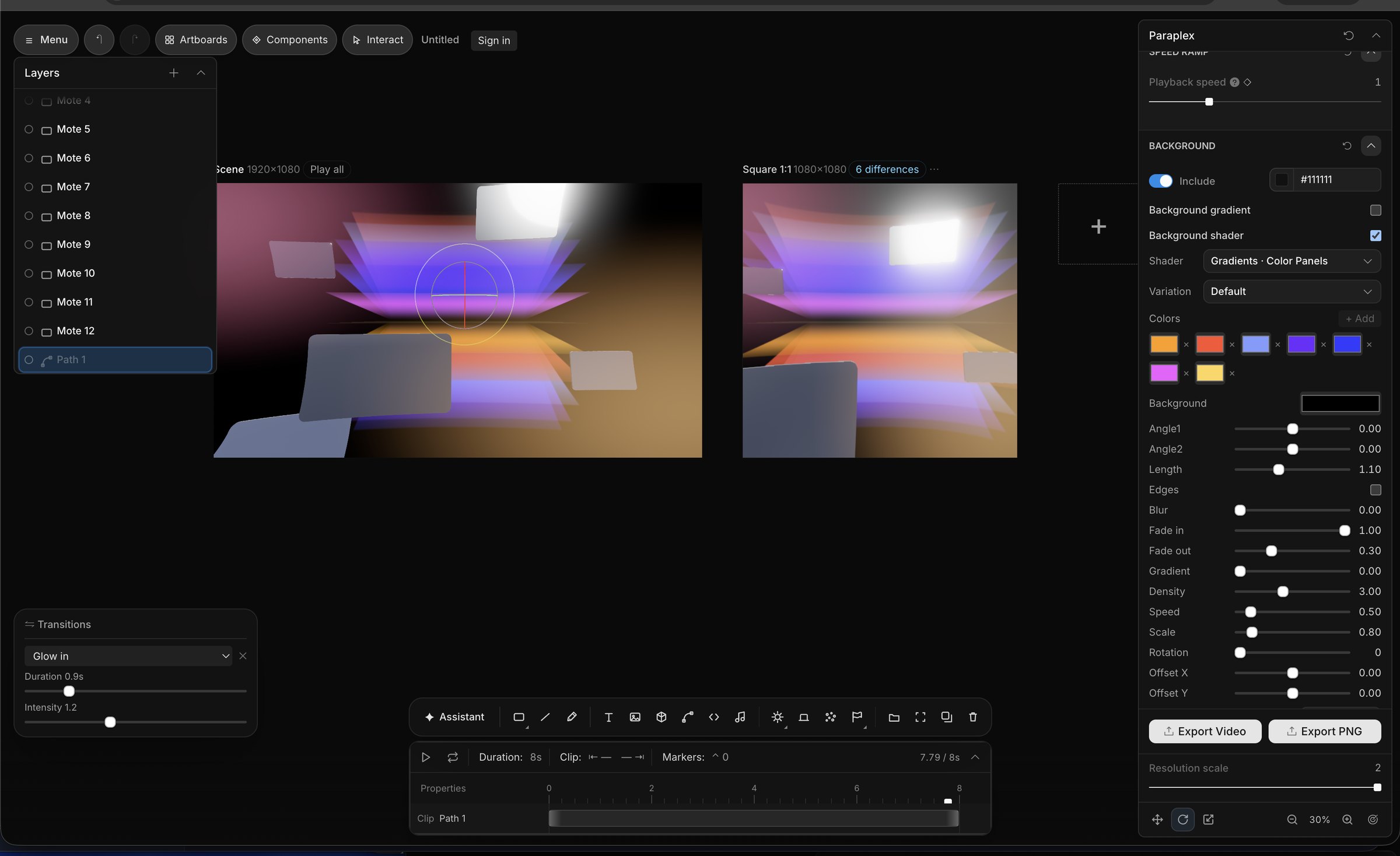
Screenshot of the editor interface for Paraplex, a 3D motion design app, featuring a timeline, panels with editable sliders and settings for things like glass material refraction, dispersion, IOR, transmission, and other panels like a layers panel and transitions panel and gradient settings with animated keyframes.
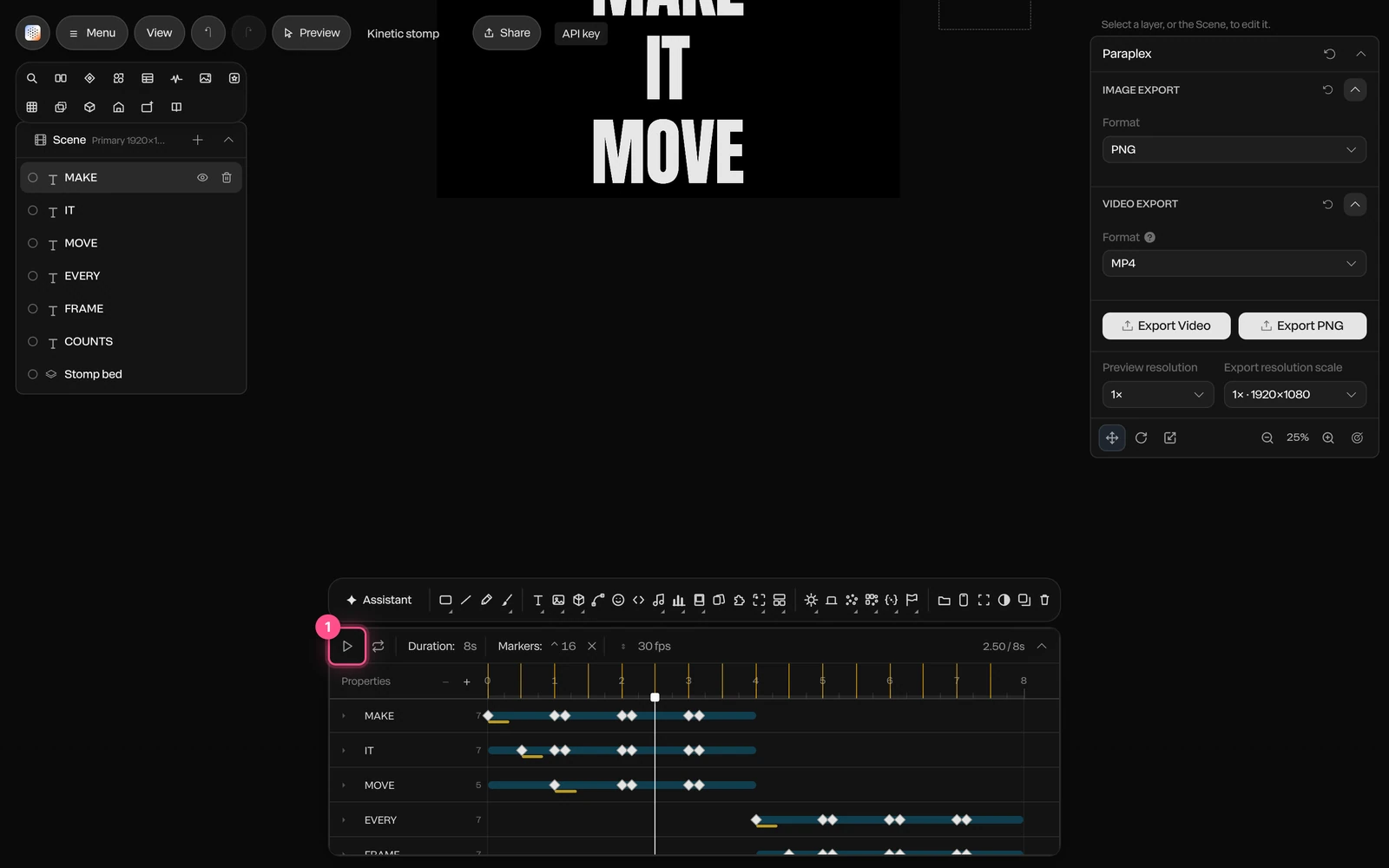
Screenshot of AI motion design in the Paraplex app, showcasing the built-in AI assistant producing fully editable outputs that the user can configure in the Paraplex app's UI, and easily make fully 3D scenes from scratch using agentic AI workflows.
A screenshot of the UI from the Paraplex app, displaying a series of sliders and settings used to build 3D motion graphics in the browser, including abstract meta blobs and liquid glass shapes
Paraplex and Jitter compared feature by feature, as of October 2026
ParaplexJitter
3DReal 3D scenes: physically based glass, chrome and metal, lights, HDRI and shadows; path-traced Studio render (Pro); GLB and glTF importNo native 3D scenes; 3D flip effects and AI-built 3D rotations on flat layers
GlassLiquid glass with 10 keyframeable dials, inside a lit 3D sceneAn animatable 2D glass effect with refraction, depth, dispersion, frost and light controls (May 2026)
AIAn assistant with 140 tools edits layers, keyframes, camera and materials; every turn is a preview you Apply or Discard; Director mode storyboards firstJitter AI and Superagents edit layers on the canvas, in Balanced (Claude Sonnet 5.5) or Smart (Claude Opus 5.5) mode; Jitter MCP in beta since October 20, 2026
TimelineKeyframe timeline with a diamond on every setting, 23 easing presets and springs; pieces up to an hour at 10 to 120 fpsAction-based timeline with no keyframes required; easing presets and custom curves
Video exportFree: 1080p at 30 fps, no watermark. Pro: 4K at 60 fpsFree: 720p at 30 fps, with a watermark. Pro: 1080p at 60 fps. Max and Ultra: 4K at 120 fps
FormatsMP4, WebM, GIF, PNG, Lottie (flat layers), USDZ and a live web embedMP4, MOV, WebM, GIF and Lottie; ProRes on Pro and up
Transparent videoWebM with alpha and PNG sequences, free to 1080p at 30 fpsProRes 4444 and WebM, on Max and up
Data and variantsCharts from a pasted CSV; one version per spreadsheet row, columns matched to layers by name; every format and variant in one batch on ProBulk Create from a CSV for text and image swaps (July 2026); chart templates; batch export on Max and up
Live web embedInteractive embed with hover, click, drag, scroll, state machines, breakpoints and an embed APINot listed; exports video, GIF and Lottie
Templates77 in 13 categories300+
CollaborationNo real-time co-editing yet; shareable links, links to an editable copy and notes on the canvasReal-time co-editing and comments in a shared workspace; up to 10 editors on Pro and 50 on Max
FigmaPaste SVG from Figma as editable vector paths; import design tokens from Figma variable exportsFigma plugin used by more than 300,000 designers
PriceFree plan; Pro $19/mo billed yearly or $24 month to monthFree plan; Pro, Max and Ultra are billed per editor (prices at jitter.video/pricing)
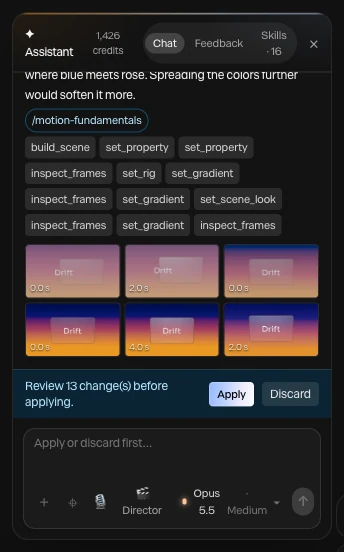
A finished assistant turn in Paraplex: the steps it took as chips, the motion-fundamentals skill it read, six frames it checked, and Review 13 changes before applying with Apply and Discard

Screenshot · a finished turn, waiting for Apply

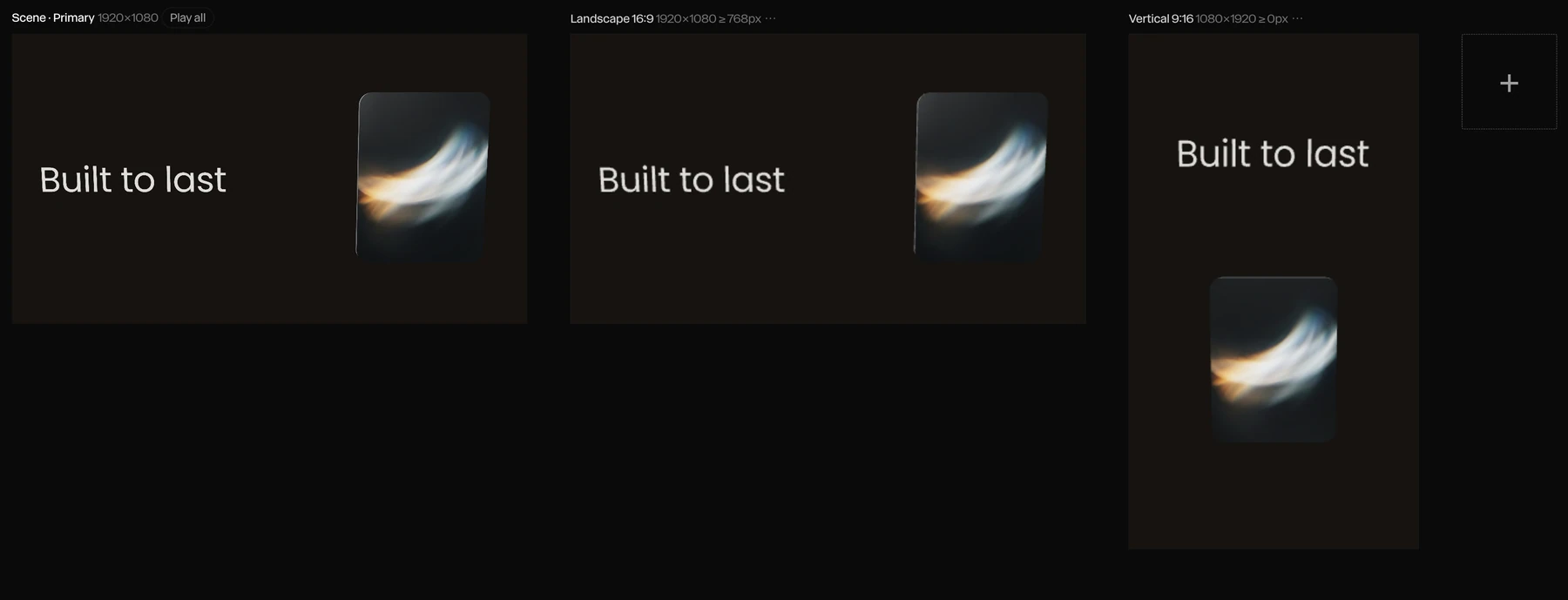
One scene on three artboards in Paraplex: on the primary and the 16:9 artboard the headline Built to last sits beside a glass card, and on the 9:16 artboard it stacks above the card

Screenshot · Responsive re-stacks the 9:16 artboard