
Concept render

Whole scenes from a sentence.
Type what you want on the home page and click Make it. A new file opens and the assistant builds the scene from real layers, materials and keyframes.
Describe a scene and Paraplex's assistant builds it with the same layers, keyframes and tools you use: 3D models, materials, camera movement, and type. Every change waits for your Apply, and everything it makes can be edited by hand.
Unlimited free 1080p exports. No watermark. Runs in your browser.
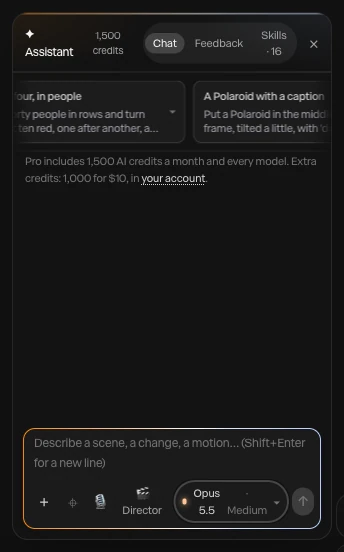
Screenshot · the AI assistant panel in Paraplex
Most AI tools hand you a flat video. Paraplex's assistant hands you the project. It speaks Paraplex: it builds with the same layers, keyframes and settings you use, shows every step it took and every frame it checked, and changes nothing until you press Apply. What it makes is yours to edit, down to the last keyframe.
Six prompts to start from. Copy one, paste it into the assistant in Paraplex, then Apply what you like and keep editing by hand.
01 · A product drop
Three dark glass cards fan out on a black studio floor, then a white price counts up from $0 to $49
Copy prompt02 · A chrome title
Turn the headline into 3D chrome text, sweep a light across it, and push the camera in slowly
Copy prompt03 · A model from scratch
Generate a 3D model of a vintage film camera, light it with a warm key light, and orbit around it for six seconds
Copy prompt04 · A stat that lands
Add a big bold number that counts from 0 to 128,400 over four seconds, then fade a caption up underneath it
Copy prompt05 · Calmer timing

Make the whole piece feel calmer: softer ease-outs, and stagger the cards 0.15 seconds apart
Copy prompt.jpg)
Render needed · AA-P1
Prompt 01, built live
10–20 s · 16:9 · screen recording, sped up where it waits
Prompt pasted into the assistant and sent. Three dark glass cards fan out on a black studio floor; the assistant adds the layers and keyframes; a white price counts up to $49; Apply. Dark editor, calm monochrome scene.

Render needed · AA-P2
Prompt 02, built live
10–20 s · 16:9 · screen recording, sped up where it waits
Prompt pasted into the assistant and sent. The headline turns to 3D chrome; a light sweep runs across it; the camera pushes in slowly; Apply. Dark editor, calm monochrome scene.

Render needed · AA-P3
Prompt 03, built live
10–20 s · 16:9 · screen recording, sped up where it waits
Prompt pasted into the assistant and sent. A vintage film camera model is generated, lands as a layer, gets a warm key light, and the camera orbits it; Apply. Dark editor, calm monochrome scene.
Render needed · AA-P4
Prompt 04, built live
10–20 s · 16:9 · screen recording, sped up where it waits
Prompt pasted into the assistant and sent. A bold number counts from 0 to 128,400 over four seconds and a caption fades up under it; Apply. Dark editor, calm monochrome scene.
Render needed · AA-P5
Prompt 05, built live
10–20 s · 16:9 · screen recording, sped up where it waits
Prompt pasted into the assistant and sent. On an existing card scene, keyframes spread apart and ease-outs soften on the timeline; the piece replays calmer; Apply. Dark editor, calm monochrome scene.
Render needed · AA-P6
Prompt 06, built live
10–20 s · 16:9 · screen recording, sped up where it waits
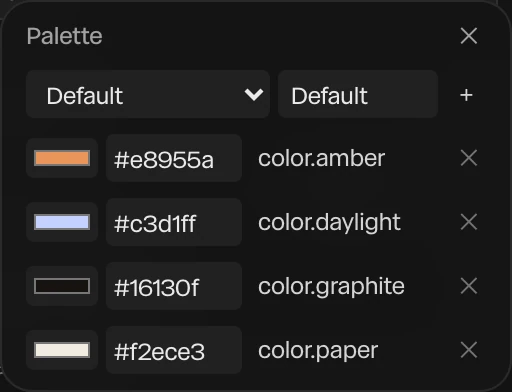
Prompt pasted into the assistant and sent. A template restyles in a saved design system: type, materials and colors change at once; Apply. Dark editor, calm monochrome scene.
The assistant works on a copy of your scene, so nothing on your canvas moves while it builds. When it's done, you see what it did: one chip per change, the skills it read, and the frames it rendered to check its own work.
Then you choose. Apply puts the changes in your scene; Discard leaves it exactly as it was. One undo after Apply takes back the whole turn, however many layers it built. Non-destructive, every time.
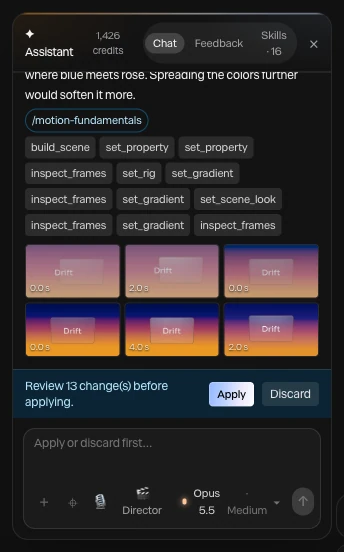
Screenshot · a finished turn, waiting for Apply
Direct feedback, tied to the scene itself. Show the assistant exactly which layers you mean, and it edits those and leaves the rest alone.
01
Click Point at it beside the message box, then click a layer on the frame. It rides along with your message as a chip, so “make this a pale warm amber” can only mean one thing.
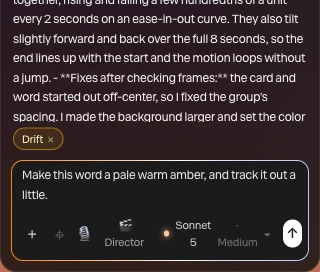
Screenshot · a layer picked with Point at it
02
Drag over part of the frame to pick several layers at once. The assistant also gets a picture of what's under the box, so it sees the area you mean, not just the names.
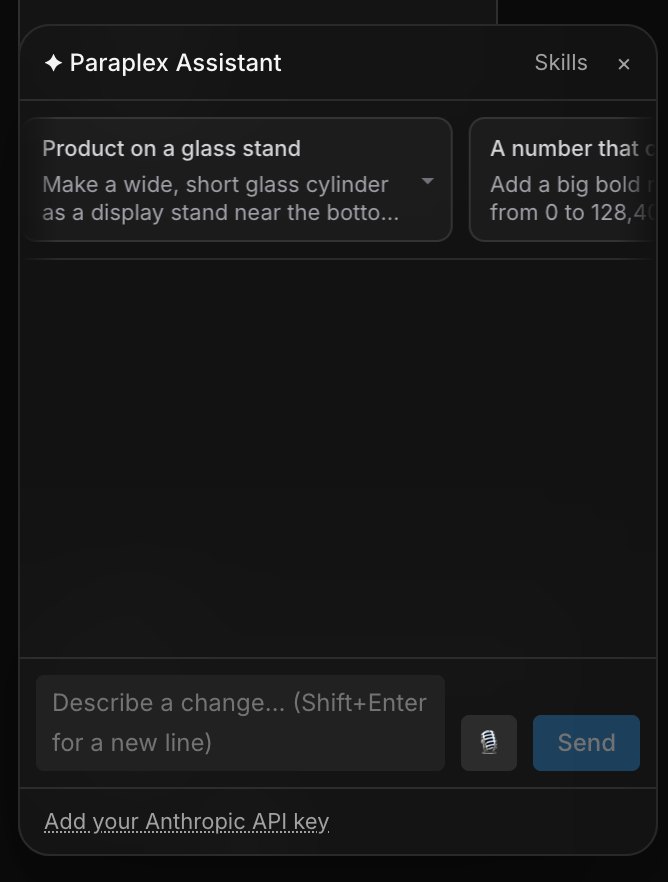
Render needed · AA-03b
Drag a box over the frame
6–8 s · 9:16 crop of a screen recording
Point at it on; a box is dragged over three glass cards; three chips appear over the message box; “make these the same width” is sent.
03
Right-click a layer and choose Comment. Threads stay on that layer in the Feedback tab until you send them to the assistant, and its answers are written into the thread: a record of every round.
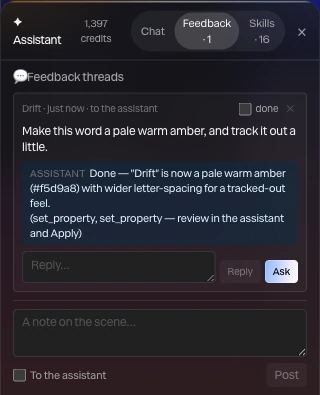
Screenshot · a feedback thread on a layer
04
Right-click any layer and choose Ask the assistant about this. The layer is picked and you're in the message box, ready to say what should change.
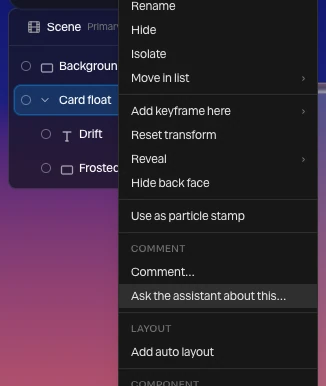
Screenshot · Ask the assistant about this
Concept render
Whole scenes from a sentence.
Type what you want on the home page and click Make it. A new file opens and the assistant builds the scene from real layers, materials and keyframes.
Concept render

Pictures, icons and textures.
Images, SVG icons, overlays, tileable textures and backgrounds, generated for the job and placed in your scene.
Concept render

Original 3D models.
Ask for an object and it generates a real 3D model layer, lit and animated like anything else in the scene.
Concept render

Built from your reference.
Attach a photo, a screenshot or a video; video is read as time-labeled frames, so it can follow the timing. Attach design tokens or a brand kit and it builds in your colors and type.
Nudging keyframes, reshaping easing curves, staggering layers so they arrive one after another: describe the result and the assistant does the fiddly part. It writes ordinary keyframes and curves, so you can still drag any of them by hand.
Spend your time on the direction instead. For a whole piece, Director mode writes a plan and a storyboard of stills for you to approve, then builds it section by section, checking each one as it goes.
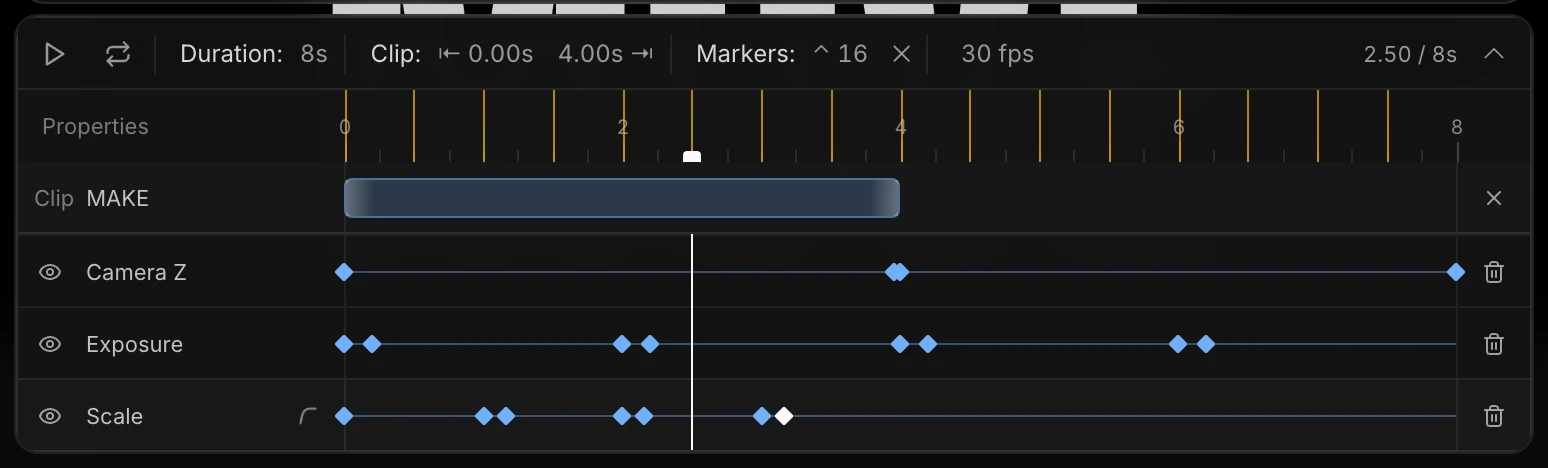
Render needed · AA-05
“Make it calmer”, on the timeline
8 s · 1:1 crop of a screen recording
Prompt P5 sent; keyframe diamonds on the timeline spread apart, easing curves soften; Apply; the piece replays, slower and staggered.
Skills are instructions the assistant reads when a task calls for them. Paraplex ships with a library of motion, type, camera and editing craft, so the assistant brings a motion designer's habits to your very first prompt.
18
built-in skills, from motion fundamentals to camera language
140
tools it builds with: the editor's own layers, keyframes and settings
Motion fundamentals: timing, spacing, easing
Typography in motion
Camera language
Editing and rhythm
Look and color
Paraplex recipes: kinetic titles, card carousels, chart reveals, UI tours, product heroes
Logo match cuts
3D documentary Shorts from a script
Interface animation and polish
Read automatically when a task matches
Pin a skill for your next message
Turn one on for every turn in a project
Switch any skill off, or export it as a .zip
Turn your house style into a skill. Create from brand writes one from your design system and up to three projects that already move the way your brand does, timing and curves included.
Or write one for a workflow you repeat in Paraplex, upload the skills you already use, or ask the assistant to write one for you. Each reply shows which skills it read, so you always know why it did what it did.
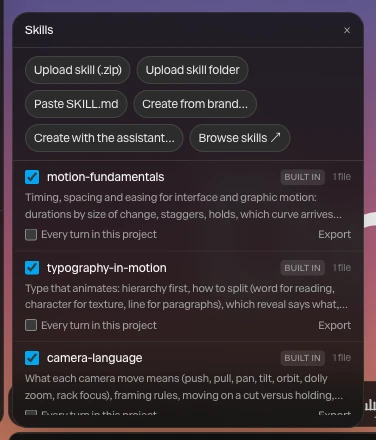
Screenshot · the Skills window
The assistant never takes over the editor. Hand it a whole piece, ask it for one small change, or close the panel and build everything yourself. Every tool it uses is right there for you, too.
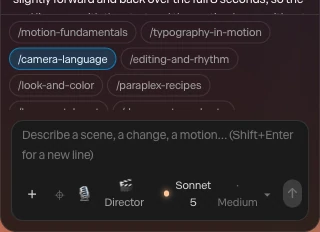
Render needed · AA-06a
Director mode, plan to build
10 s · 16:9 · screen recording
Director on, one-line brief sent; the plan and storyboard stills arrive in the panel, Build it is clicked, sections build one by one. Dark editor, calm scene.
A whole piece: Director mode plans it, storyboards it, then builds it
Render needed · AA-06b
Point at one word, change only it
6–8 s · 9:16 crop of a screen recording
Point at it picks one word on the frame; “make this pale warm amber” is sent; Apply; only that word changes.
One change: point at a layer and say what's different
Render needed · AA-06c
Building by hand
6 s · 1:1 crop of a screen recording
Assistant panel closed; a keyframe diamond is clicked and a curve handle dragged on the timeline.
None at all: every layer, keyframe and setting by hand
Not available yet. We're building a library of skills made by the community, which you'll browse and add from inside the assistant, with recommendations for the work in front of you.
Also coming: drawing right on the frame, so you can circle, underline or sketch over the part you mean before you send your message.
Render needed · AA-08 · concept
Coming soon: draw on the frame
Still · 1:1 · concept, labeled Coming soon
Concept only, until it ships: a hand-drawn white circle around one glass card on the frame, with a short note beside it.
Everything it makes lands in your Layers panel
Pick the model, and how hard it thinks
Speak your prompt instead of typing it
It asks when a choice is yours to make
Animated charts built from your data
It checks its own frames and fixes what's off
Your own Anthropic API key, with no credits used
Voiceovers with captions timed to every word
It's an AI motion design assistant built into the Paraplex editor. Describe a scene, a change or a motion, and it builds it with the editor's own layers, keyframes, camera moves and materials. Every turn waits for you to Apply or Discard, and everything it makes stays editable by hand.
Yes. It makes ordinary layers and keyframes, the same ones you'd make yourself, so you can select, retime, restyle or delete any of it. A single undo after Apply takes back the whole turn.
No. It works on a copy of your scene and shows the steps it took and the frames it checked. Nothing changes on your canvas until you click Apply, and Discard leaves the scene as it was.
Skills are instructions the assistant reads when a task calls for them. Paraplex comes with 18 built in, covering motion timing, typography, camera language, editing and color. You can upload your own in the SKILL.md format, create one from your design system, or ask the assistant to write one.
Yes. From the assistant you can generate images, SVG icons, overlays, textures, backgrounds and 3D models, and it places them in your scene. These use their own credits, and the assistant says so before it spends them.
No. Every tool the assistant uses is in the editor for you too, so you can build everything by hand, ask for one small change, or hand it a whole piece.
Describe your first scene, then keep every layer and keyframe it makes.
Paraplex is a browser-based 3D motion design studio with an AI assistant that edits real layers and keyframes.