A Figma Motion alternative for motion that leaves the design file.

Figma Motion puts a timeline in your design file, and for interface motion that ships as code it's the natural choice. When the motion leaves Figma as a finished piece, such as a launch video, a social cut, an animated chart or a website hero, Paraplex does it in a browser tab: real 3D glass, chrome and light, an AI assistant whose every change you approve, and one scene exported for every screen or as a live embed.

Unlimited free 1080p exports.  No watermark.  Runs in your browser.

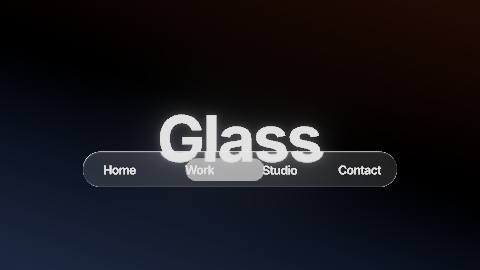
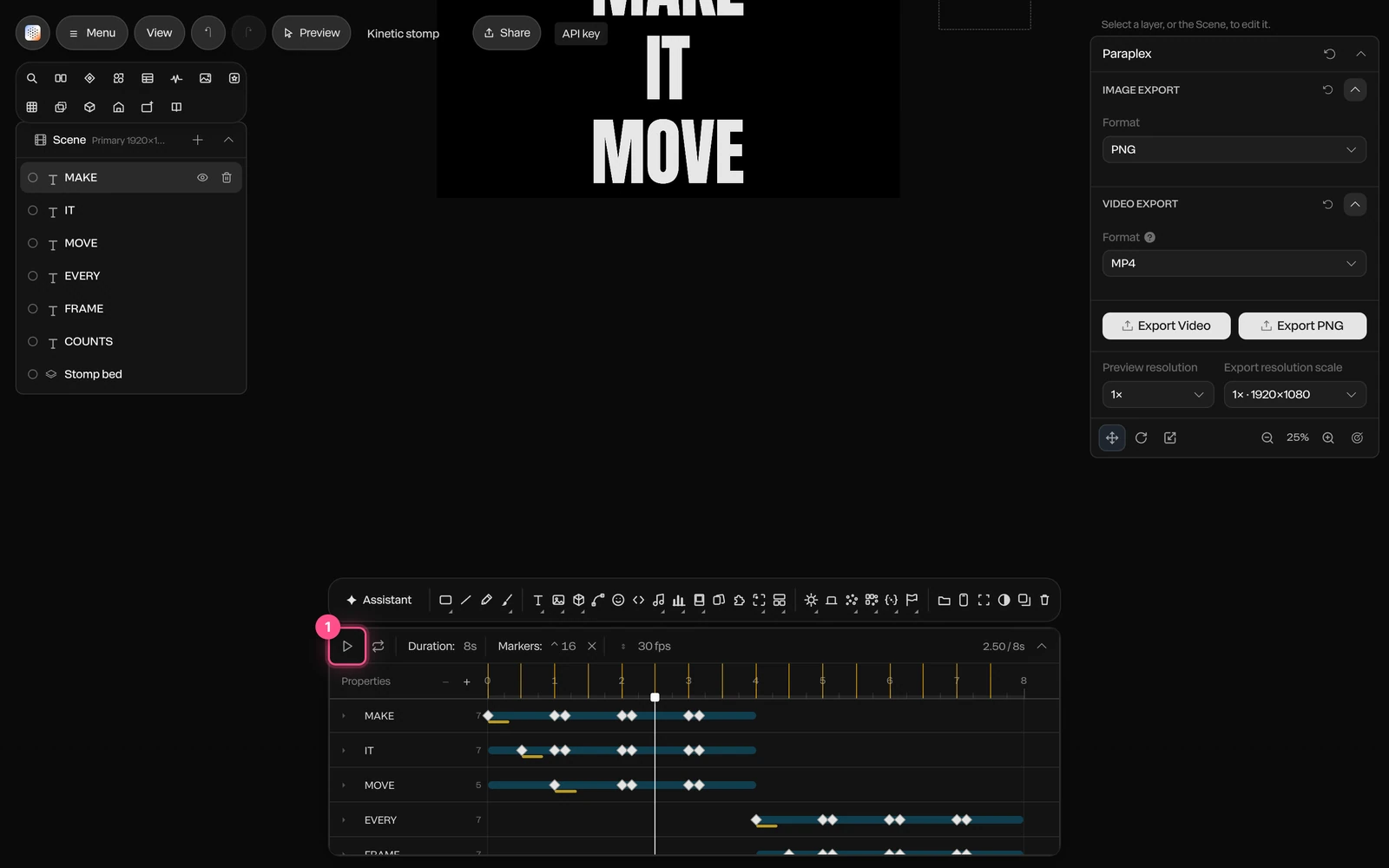
The Liquid glass nav template made in Paraplex: a liquid glass nav bar floats over a big headline, bending the letters beneath it, while a soft pill slides from label to label

Paraplex vs Figma Motion, feature by feature

As of October 29, 2026
Paraplex and Figma Motion compared feature by feature, as of October 2026
ParaplexFigma Motion
Where it runsIn a browser tab, nothing to install; projects sync once you sign inInside Figma Design files, in the browser or Figma's desktop app; switch the toolbar to Motion
Status and priceFree plan with 1080p exports and no watermark; Pro $19/mo billed yearly or $24 month to monthOpen beta since June 24, 2026, for Full seats on every plan; free Starter exports capped at 1080p and 30 fps; Professional Full seat $16/mo billed yearly
Built forFinished motion: launch and demo videos, social cuts, animated type and charts, website heroesUI and product motion inside the design file, handed to developers as code
3DEvery scene is real 3D: physically based glass, chrome and metal, lights, HDRI and shadows; path-traced Studio render (Pro)2D canvas; 3D transforms (z-axis rotation of frames, vectors and text) announced, on a waitlist
AIAn assistant with 140 tools builds layers, keyframes, camera moves, materials and charts; every turn a preview you Apply or DiscardThe Figma agent adds keyframes from a prompt, grounded in your components and tokens; paid plans, uses Figma AI credits
TimelineA keyframe on every setting, 23 easing presets and springs, 40+ text presets; pieces up to an hour at 10 to 120 fpsKeyframes for position, scale, rotation, opacity and shader properties; easing curves, springs, presets and text by character, word or line
Design systemComponents and instances, design systems with motion tokens, W3C design token importAnimated components, motion variables with modes and custom animation styles, published to team libraries
Video exportMP4 and WebM; Free 1080p at 30 fps, Pro up to 4K at 60 fps; transparent WebM and PNG sequences on bothMP4, WebM, GIF and animated SVG; above 1920×1080 or 30 fps on paid plans
Audio and captionsElevenLabs voiceovers with word-by-word captions, AI sound effects and music, beat detection; SRT and WebVTT exportAudio files on the timeline, trimmed and exported with MP4 and WebM
Every aspect ratioArtboards for 16:9, 9:16, 1:1, 4:5 and 4:3 with Responsive framing and social safe zones; export all enabled in one goEach export is a top-level frame at the size you set; no per-format reframing in Figma's documentation
Lottie, code and webLive interactive embed (hover, click, drag, scroll, state machines); Lottie export of flat layers; no CSS or React code exportCSS, JSON and React code from Dev Mode, plus context for coding agents through the Figma MCP server; Lottie and dotLottie export (shaders and video unsupported)
DataCharts from a pasted CSV; one version per spreadsheet row, batch export on ProNo chart-from-data tool or per-row versions in Figma Motion's documentation
CollaborationShareable links, an editable copy by link, notes on the canvas; no real-time co-editingReal-time multiplayer editing in Figma, with comments pinned to a moment on the timeline

Figma Motion is in open beta and changes often: custom animation styles, audio, text animation and Lottie export arrived on September 30, 2026, and 3D transforms are on a waitlist, so check Figma's release notes for anything newer than October 29, 2026. The gaps run both ways. Figma Motion wins on interface motion, developer handoff and live co-editing; Paraplex wins on 3D light, finished video for every channel, data, voice and the live web embed.

The short version.

Paraplex

Choose Paraplex if you need

Real 3D: glass, chrome and metal lit by studio lights and HDRI environments, with a path-traced Studio render on Pro

A finished video for every channel: one scene reframed for 16:9, 9:16, 1:1, 4:5 and 4:3, up to 4K at 60 fps on Pro

Voiceovers with word-by-word captions, AI sound effects and music, and cuts that snap to the beat

Animated charts from a CSV, and one version of a piece per spreadsheet row

A live, interactive embed for your website that answers hover, click, drag and scroll

Figma Motion

Choose Figma Motion if you need

UI and product motion that lives in the same file as your components and variables

Animation your developers copy as CSS, JSON or React code from Dev Mode

Real-time co-editing, with comments pinned to a moment on the timeline

Animated components and motion variables published to your team's libraries

Nothing new to buy: Figma Motion comes with every Full seat during the open beta

Both

Both run in a browser, with keyframe timelines, easing curves and springs, text animated by character, word or line, an AI that adds motion from a prompt, components with instances, and MP4, WebM, GIF and Lottie export.

Three differences that change what you can make.

Figma Motion brings a timeline to the design file, and for interface motion that's hard to beat. These are the places where a piece needs more than the canvas can give it.

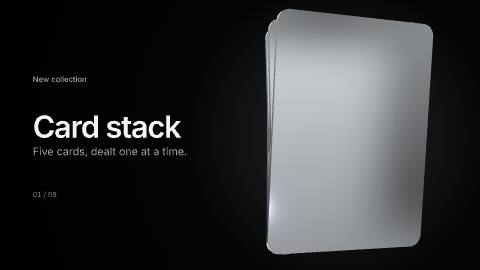
The Card stack, chrome template made in Paraplex: five thin cards of polished chrome fan up and are dealt off one at a time, reflections sliding over the metal as they turn

01

Real light and materials, not a flat canvas.

As of October 2026, Figma Motion animates position, scale, rotation and opacity on Figma's 2D canvas, plus the properties of shader effects. Figma has announced 3D transforms that turn frames, vectors and text on the z-axis, with a waitlist; they aren't generally available yet.

Every Paraplex scene is real 3D: physically based glass, chrome and metal, lights you place and animate, 11 environments and 8 HDRI panoramas, cast shadows and a camera with depth of field. Press D and it still edits like a flat design tool, and a path-traced Studio render is on Pro.

More on 3D motion graphics and liquid glass.

Paraplex

Physically based materials, lights, HDRI, shadows and a 3D camera

Figma Motion

2D canvas and shader effects; 3D transforms on a waitlist

02

One scene, every channel, up to 4K.

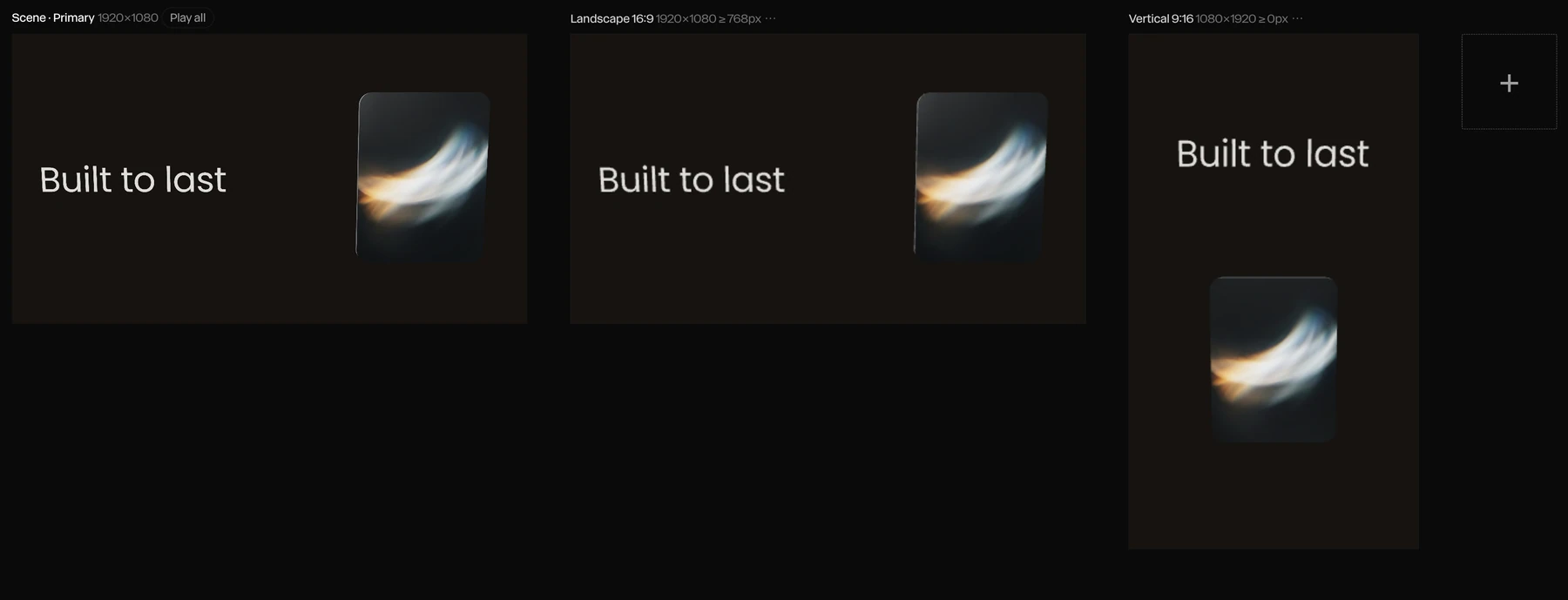
Add 9:16, 1:1, 4:5 or 4:3 artboards and Paraplex reframes the scene for each. Responsive framing re-stacks blocks side by side or top to bottom, safe zones show where TikTok, Reels and Shorts cover the frame, and every enabled format exports in one go, up to 4K at 60 fps on Pro.

In Figma Motion you export a top-level frame at the size you set, and video larger than 1920×1080 or faster than 30 fps needs a paid Figma plan.

More on dynamic artboards for every aspect ratio.

Paraplex

Artboards per format, safe zones, up to 4K at 60 fps (Pro)

Figma Motion

A frame per export; above 1080p or 30 fps on paid plans

03

Voice, charts and a live embed, built in.

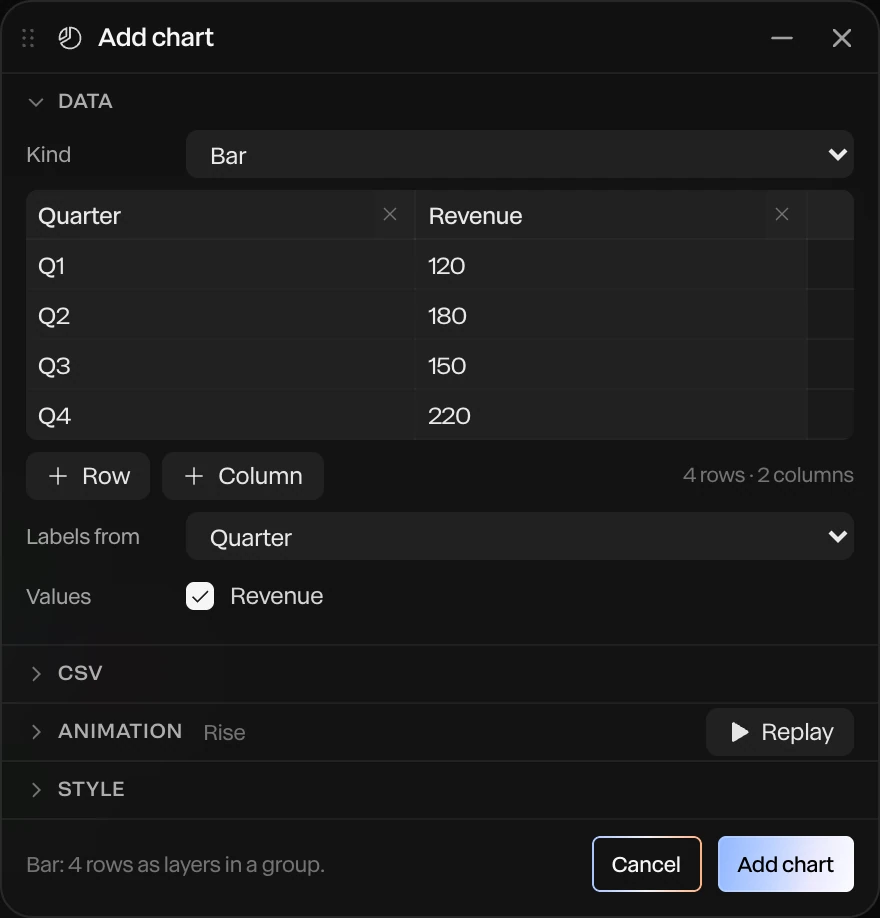
Type a script and Paraplex adds an ElevenLabs voiceover with a caption on every word, timed from the voice. Paste a CSV of up to 400 rows and it builds an animated bar, line, donut or scatter chart whose every bar, label and axis is a layer.

Then publish the scene as a live embed that answers hover, click, drag and scroll, or export MP4, transparent WebM, GIF or Lottie. Figma Motion takes audio files you bring and hands animation to developers as code; chart-from-data and voiceover tools aren't in its documentation.

More on animated charts, narrated social videos and website hero animations.

Paraplex

AI voiceover with word captions, charts from a CSV, live embed

Figma Motion

Audio you bring; CSS, JSON or React code for developers

When Figma Motion is the better choice.

If the motion belongs to your product's interface, Figma Motion is the right tool, and it's already in the file. As of October 2026, pick it in these cases, or use both: animate interface states in Figma, then bring the frames into Paraplex for the launch video.

UI motion that ships as code.

Button states, transitions and micro-interactions that developers copy as CSS, JSON or React code from Dev Mode, or pull into a coding agent through the Figma MCP server. Paraplex exports video, Lottie and live embeds, not product code.

Your whole team, live.

Figma is multiplayer: designers, PMs and engineers edit and comment on the same file at once, with comments pinned to a moment on the timeline. Paraplex has shareable links, editable copies and notes on the canvas, but no real-time co-editing.

Motion inside your design system.

Animated components, motion variables with modes and custom animation styles publish to the same libraries as your components and tokens, so every file that uses them inherits the motion.

Quick moves on screens you already have.

If the frames are already in Figma and the motion is a fade, a slide or a scale, a preset on the timeline is faster than moving the work anywhere.

Animated SVG for the web.

Figma Motion exports animated SVG as well as Lottie and dotLottie. Paraplex exports Lottie for flat layers, plus MP4, WebM, GIF and a live embed, but not animated SVG.

You already pay for Figma.

Figma Motion comes with every Full seat during the open beta, alongside Figma Design, Dev Mode, Make and Sites. A Professional Full seat is $16 a month billed yearly, as of October 2026.

Bringing your Figma work across.

Paraplex doesn't open .fig files. Your Figma work comes across in open formats today and stays editable once it lands, ready for depth, light and every-format export.

Once it's in, components work the way they do in Figma, with masters and instances: more on reusable components and design systems.

SVG, pasted.

Copy a frame, logo or icon from Figma as SVG and paste it into Paraplex: every shape arrives as an editable vector path you can give depth, a material and motion.

Variables as design tokens.

Import W3C design token files, the format Figma variable exports produce through common plugins, to build a palette and design system. Aliases stay live, and colors stay linked to the layers that use them.

A folder of exports.

Export your frames as images and Build scene from folder turns up to 50 of them into a grid of picture cards in one step, ready to light and move.

Lottie files.

Figma Motion can export Lottie and dotLottie. Paraplex opens .json and .lottie files as native layers with their keyframes and easing, and lists anything it can't carry instead of dropping it silently. Test a file before you rely on it.

Send Figma frames straight in.

The free Send to Paraplex plugin, listed on Figma Community in November 2026, sends the frames you select to Paraplex as native, editable layers, nested as they are in Figma. Vectors, text and Figma's Glass come across without the SVG and token steps, and auto layout lists stay live.

SVG paste, token import and folder import, described above, still work beside it.

See what else comes along from Figma on Paraplex for designers, or compare every tool on the alternatives page.

Step by step: the Figma to motion guide.

Other Figma Motion alternatives.

Paraplex isn't the only option. If your work leans a different way, these are worth a look, as of October 2026.

Best for quick 2D motion with templates

Jitter

A browser-based 2D motion tool with a large template library, a Figma plugin, real-time team editing and a free plan.

Paraplex vs Jitter

Best for VFX and long timelines

After Effects

Adobe's desktop standard for compositing, visual effects on footage and the Premiere round trip, sold by subscription.

Paraplex vs After Effects

Best for Lottie production

LottieFiles

Lottie Creator for editing in the browser, plus a Figma plugin that exports Figma Motion keyframes as Lottie or dotLottie, with hosting and playback for developers.

Best for interactive animation inside apps

Rive

An editor and runtimes for interactive, state-driven animation that runs inside apps, games and websites rather than as video.

Best for procedural 2D motion

Cavalry

A desktop app for Mac and Windows built on procedural, data-driven animation, with a free Starter plan.

Questions about Paraplex and Figma Motion

What is the best Figma Motion alternative?

It depends on where the motion ends up. As of October 2026, Figma Motion is the natural choice for interface motion that stays in your design file and ships as code. When the motion leaves Figma as a finished piece, such as a launch video, a social cut, an animated chart or a website hero, Paraplex is a browser-based alternative with real 3D light, an AI assistant whose changes you approve, and a free plan. Jitter suits quick 2D motion from templates, and After Effects suits visual effects and compositing on footage.

Is Figma Motion free?

Partly. As of October 2026, Figma Motion is in open beta for Full seats on every Figma plan, including the free Starter plan, but Starter exports are limited: video larger than 1920×1080 or faster than 30 fps, the Figma agent for motion and publishing animated components need a paid plan. A Professional Full seat costs $16 a month billed yearly. Paraplex's free plan exports 1080p at 30 fps with no watermark, transparent video included, and 100 AI credits a month; Pro costs $19 a month billed yearly or $24 month to month and adds 4K at 60 fps, batch export, Studio render and 1,500 AI credits a month.

Does Figma Motion support 3D?

Not yet. As of October 2026, Figma has announced 3D transforms that rotate frames, vectors and text on the z-axis, with a waitlist, but they aren't generally available, and Figma Motion animates position, scale, rotation, opacity and shader properties on a 2D canvas. Every Paraplex scene is real 3D, with physically based glass, chrome and metal, lights, HDRI environments, shadows and a camera with depth of field, while still editing like a flat design tool in 2D mode.

Can I bring my Figma designs into Paraplex?

Yes. The free Send to Paraplex plugin copies the Figma frames you select, and you paste them into Paraplex as native, editable layers. You can also paste SVG copied from Figma as editable vector paths, import W3C design token files, the format Figma variable exports produce through common plugins, to build a palette and design system, and turn up to 50 exported images into picture cards with Build scene from folder. Paraplex also opens Lottie (.json and .lottie) files as native layers. It doesn't open .fig files.

Can Paraplex export code like Figma Motion?

No. Figma Motion's Dev Mode copies CSS, JSON or React code for developers. Paraplex exports MP4 and WebM video, GIF, PNG, Lottie for flat layers and a live interactive embed, and its code layers run HTML, React and GSAP inside a scene, but it doesn't export animation as product code. If engineers will rebuild the animation in your app, Figma Motion is the better fit.

How is Paraplex's AI different from the Figma agent?

As of October 2026, the Figma agent adds keyframes to the Figma Motion timeline from a prompt, grounded in your components and tokens; for motion it needs a paid plan and uses Figma AI credits. Paraplex's assistant builds whole scenes with 161 tools across layers, keyframes, camera moves, materials, charts and captions, shows each turn as a preview you Apply or Discard, and leaves ordinary layers and keyframes you can edit by hand.

Does Paraplex have components and design tokens like Figma?

Yes. Save a layer or group as a component and its instances follow the master's edits while overriding their own fields, nested up to three deep. Design systems hold a brand's colors, fonts, text styles, materials, scene looks and motion tokens and apply to any scene in one step, and palette colors can carry Light and Dark values that linked layers follow.

Build with Paraplex.

Start free in your browser. Upgrade when your work needs 4K.

Paraplex is a browser-based 3D motion design studio with an AI assistant that edits real layers and keyframes.

Point title.

One or two sentences.

Section heading.

One or two sentences on what this list covers.

The short version.

Paraplex

Choose Paraplex if you need

First reason

Second reason

Third reason

Competitor

Choose the competitor if you need

First reason

Second reason

Third reason

Both

What the two tools share.

Where they differ.

One or two sentences that frame the differences.

01

Difference title.

Two or three sentences on the difference.

Paraplex

What Paraplex does.

Competitor

What the competitor does.

Paraplex and Jitter compared feature by feature, as of October 2026
ParaplexJitter
3DReal 3D scenes: physically based glass, chrome and metal, lights, HDRI and shadows; path-traced Studio render (Pro); GLB and glTF importNo native 3D scenes; 3D flip effects and AI-built 3D rotations on flat layers
GlassLiquid glass with 10 keyframeable dials, inside a lit 3D sceneAn animatable 2D glass effect with refraction, depth, dispersion, frost and light controls (May 2026)
AIAn assistant with 140 tools edits layers, keyframes, camera and materials; every turn is a preview you Apply or Discard; Director mode storyboards firstJitter AI and Superagents edit layers on the canvas, in Balanced (Claude Sonnet 5.5) or Smart (Claude Opus 5.5) mode; Jitter MCP in beta since October 20, 2026
TimelineKeyframe timeline with a diamond on every setting, 23 easing presets and springs; pieces up to an hour at 10 to 120 fpsAction-based timeline with no keyframes required; easing presets and custom curves
Video exportFree: 1080p at 30 fps, no watermark. Pro: 4K at 60 fpsFree: 720p at 30 fps, with a watermark. Pro: 1080p at 60 fps. Max and Ultra: 4K at 120 fps
FormatsMP4, WebM, GIF, PNG, Lottie (flat layers), USDZ and a live web embedMP4, MOV, WebM, GIF and Lottie; ProRes on Pro and up
Transparent videoWebM with alpha and PNG sequences, free to 1080p at 30 fpsProRes 4444 and WebM, on Max and up
Data and variantsCharts from a pasted CSV; one version per spreadsheet row, columns matched to layers by name; every format and variant in one batch on ProBulk Create from a CSV for text and image swaps (July 2026); chart templates; batch export on Max and up
Live web embedInteractive embed with hover, click, drag, scroll, state machines, breakpoints and an embed APINot listed; exports video, GIF and Lottie
Templates77 in 13 categories300+
CollaborationNo real-time co-editing yet; shareable links, links to an editable copy and notes on the canvasReal-time co-editing and comments in a shared workspace; up to 10 editors on Pro and 50 on Max
FigmaPaste SVG from Figma as editable vector paths; import design tokens from Figma variable exportsFigma plugin used by more than 300,000 designers
PriceFree plan; Pro $19/mo billed yearly or $24 month to monthFree plan; Pro, Max and Ultra are billed per editor (prices at jitter.video/pricing)
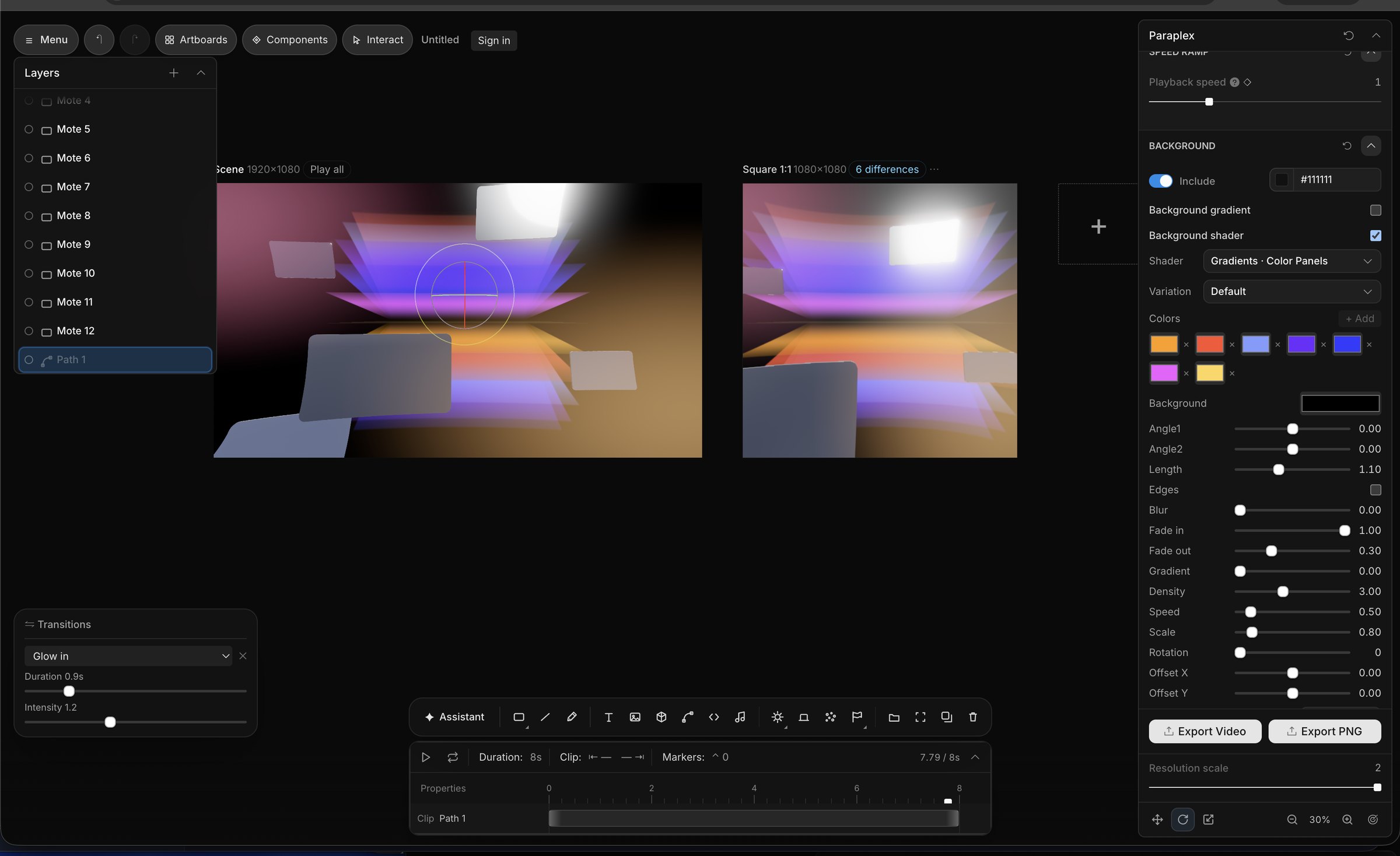
Screenshot of the editor interface for Paraplex, a 3D motion design app, featuring a timeline, panels with editable sliders and settings for things like glass material refraction, dispersion, IOR, transmission, and other panels like a layers panel and transitions panel and gradient settings with animated keyframes.
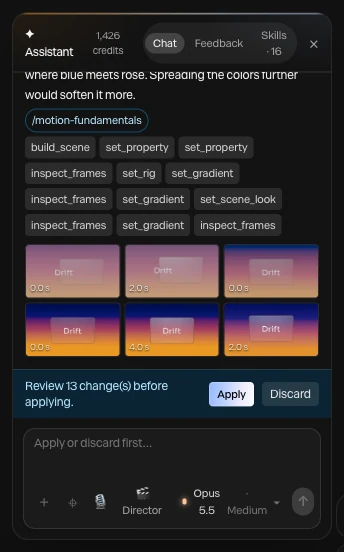
Screenshot of AI motion design in the Paraplex app, showcasing the built-in AI assistant producing fully editable outputs that the user can configure in the Paraplex app's UI, and easily make fully 3D scenes from scratch using agentic AI workflows.
A screenshot of the UI from the Paraplex app, displaying a series of sliders and settings used to build 3D motion graphics in the browser, including abstract meta blobs and liquid glass shapes
Paraplex and Jitter compared feature by feature, as of October 2026
ParaplexJitter
3DReal 3D scenes: physically based glass, chrome and metal, lights, HDRI and shadows; path-traced Studio render (Pro); GLB and glTF importNo native 3D scenes; 3D flip effects and AI-built 3D rotations on flat layers
GlassLiquid glass with 10 keyframeable dials, inside a lit 3D sceneAn animatable 2D glass effect with refraction, depth, dispersion, frost and light controls (May 2026)
AIAn assistant with 140 tools edits layers, keyframes, camera and materials; every turn is a preview you Apply or Discard; Director mode storyboards firstJitter AI and Superagents edit layers on the canvas, in Balanced (Claude Sonnet 5.5) or Smart (Claude Opus 5.5) mode; Jitter MCP in beta since October 20, 2026
TimelineKeyframe timeline with a diamond on every setting, 23 easing presets and springs; pieces up to an hour at 10 to 120 fpsAction-based timeline with no keyframes required; easing presets and custom curves
Video exportFree: 1080p at 30 fps, no watermark. Pro: 4K at 60 fpsFree: 720p at 30 fps, with a watermark. Pro: 1080p at 60 fps. Max and Ultra: 4K at 120 fps
FormatsMP4, WebM, GIF, PNG, Lottie (flat layers), USDZ and a live web embedMP4, MOV, WebM, GIF and Lottie; ProRes on Pro and up
Transparent videoWebM with alpha and PNG sequences, free to 1080p at 30 fpsProRes 4444 and WebM, on Max and up
Data and variantsCharts from a pasted CSV; one version per spreadsheet row, columns matched to layers by name; every format and variant in one batch on ProBulk Create from a CSV for text and image swaps (July 2026); chart templates; batch export on Max and up
Live web embedInteractive embed with hover, click, drag, scroll, state machines, breakpoints and an embed APINot listed; exports video, GIF and Lottie
Templates77 in 13 categories300+
CollaborationNo real-time co-editing yet; shareable links, links to an editable copy and notes on the canvasReal-time co-editing and comments in a shared workspace; up to 10 editors on Pro and 50 on Max
FigmaPaste SVG from Figma as editable vector paths; import design tokens from Figma variable exportsFigma plugin used by more than 300,000 designers
PriceFree plan; Pro $19/mo billed yearly or $24 month to monthFree plan; Pro, Max and Ultra are billed per editor (prices at jitter.video/pricing)
Paraplex and After Effects compared feature by feature, as of November 2026
ParaplexAfter Effects
Where it runsIn a browser tab, nothing to install; projects sync once you sign inDesktop app for Windows 11 or macOS 15 and later; 16 GB of RAM minimum
PriceFree plan with 1080p exports and no watermark; Pro $19/mo billed yearly or $24 month to monthUS$22.99/mo on an annual plan billed monthly (US$263.88 prepaid yearly), or $34.49 month to month; also in Creative Cloud Pro; 7-day free trial
Built forMotion graphics: launch and demo videos, animated type and charts, website heroes, social postsMotion graphics, compositing and visual effects for film, TV and video
3DEvery scene is real 3D: physically based glass, chrome and metal, lights, HDRI and shadows; path-traced Studio render (Pro)Advanced 3D renderer, parametric meshes and Substance 3D materials, extended to 3D text and shapes in 27.0; GLB, glTF, OBJ and FBX import; Cinema 4D Lite included
AIAn assistant with 161 tools builds layers, keyframes, camera moves and materials; Director mode storyboards first; every turn a preview you Apply or DiscardAI Assistant panel in 27.0, still labeled beta: organizes projects, writes and fixes expressions, edits text and shape layers, exports Motion Graphics templates, generates images and video; most actions use credits
AI agents (MCP)Public MCP server on npm today: Claude Code or another MCP client builds and edits scenes in your open Paraplex tabLocal MCP previewed at Adobe MAX 2026 for After Effects, Premiere, Photoshop and Illustrator; private beta planned for early 2027
TimelineA keyframe on every setting, 23 easing presets and springs; pieces up to an hour at 10 to 120 fpsKeyframes, graph editor and JavaScript expressions; compositions well beyond a minute
Footage and VFXMasks, blend modes, adjustment layers and an effect library; video layers from MP4, WebM and MOV; built for motion graphics, not finishing footageKeying, motion tracking, Roto Brush and Object Matte, a large effects library and third-party plugins
Video exportMP4 and WebM; Free 1080p at 30 fps, Pro up to 4K at 60 fpsH.264, ProRes and more through the Render Queue or Adobe Media Encoder
Transparent videoWebM with alpha and PNG sequences, free to 1080p at 30 fpsProRes 4444 and other formats with alpha
Every aspect ratioArtboards for 16:9, 9:16, 1:1, 4:5 and 4:3 with Responsive framing; export all enabled in one goUsually a separate comp per aspect ratio
Web and LottieLive interactive embed (hover, click, drag, scroll, state machines); Lottie export built inNo live embed; Lottie through the free Bodymovin or LottieFiles plugins
DataCharts from a pasted CSV; one version per spreadsheet row, batch export on ProCSV and JSON files can drive layers through expressions
Review and sharingReview links with comments pinned to a moment and a spot on the frame, no reviewer account needed; Teams with Owner, Editor and Viewer roles; no real-time co-editingFrame.io for Creative Cloud included for review and approval
One scene on three artboards in Paraplex: on the primary and the 16:9 artboard the headline Built to last sits beside a glass card, and on the 9:16 artboard it stacks above the card

Screenshot · Responsive re-stacks the 9:16 artboard

The Add chart panel in Paraplex: a bar chart built from a four-row table of quarters and revenue, with CSV, animation and style options and an Add chart button

Screenshot · a chart built from four rows of data