
Articles, Guides, Roundups

Learn how great motion gets made.

How-to guides, fair tool roundups and neutral comparisons for 3D motion design and AI motion graphics, and for the videos people actually ship: launch videos, data stories, website heroes and social cuts. Every piece opens with the answer and shows when it was last checked.

Unlimited free 1080p exports.  No watermark.  Runs in your browser.

Start reading.

Guides, roundups, comparisons and reference, newest first. Every piece shows when its facts were last checked, and roundups don't rank Paraplex first by default.

A chrome four-point sparkle, the common symbol for AI, with prism-colored edges on a dark glass tile, rendered in Paraplex
Render needed ·
LN-01
Roundup
AI motion design

Best AI Motion Design Tools in 2026

12 AI motion design tools compared and ranked, sorted into three kinds: generative video, prompt-to-video agents, and AI inside a motion editor.

October 27, 2026
19

How every piece is written.

Four rules, the same on every page, so you can check the work instead of taking our word for it.

The answer first.

Every piece opens with a two-sentence answer, then shows the working. If that's all you needed, you can stop there.

Dated, with sources.

Each page shows when its facts were last checked. Roundups and comparisons link every source with an as-of date and are re-checked every quarter.

Fair, even about us.

Paraplex isn't ranked first by default. Roundups say plainly when another tool is the better pick, and neutral comparisons leave Paraplex out of the verdict.

A scene you can open.

How-to guides end with the finished project, ready to open in Paraplex and take apart layer by layer.

More ways to learn.

Learn covers the craft and the category. When you want the exact steps inside Paraplex, or a finished scene to take apart, start here.

01

How to do it in Paraplex.

The Help Center walks through every panel and tool step by step, from a first animation to the final export.

Open the Help Center

02

Take a finished scene apart.

Open any of 70+ templates and see every layer, keyframe and light that made it, then make it yours.

Browse the templates

03

Try one thing, free.

Free browser tools for liquid glass, moving gradients, kinetic type, chart videos and Lottie to MP4. No account, no watermark.

See the free tools

On the way.

The next pieces in the queue. Each one goes live here once its facts are checked.

How-to

How to make a liquid glass animation

From a blank scene to a pane of glass that bends the type behind it: the dials that matter, in order, and the finished scene to open.

Reference

Social video sizes and safe zones (2026)

Sizes, aspect ratios and safe zones for TikTok, Reels, Shorts and the Instagram feed in one sheet, re-checked whenever a platform changes its specs.

Explainer

Kinetic typography, with examples

What kinetic type is, where it works and where it doesn't, the motions that carry it, and how to make a first title card.

Roundup

Best motion graphics software

Desktop, browser and AI tools for motion graphics, sorted by the job each does best, with prices as of the day they were checked.

Comparison

Figma Motion vs Jitter

A neutral matchup of two 2D motion tools: where each is faster, what each exports, and who should pick which.

How-to

How to make a Product Hunt launch video

Length, formats and pacing that hold up on launch day, built from your real screens, with the finished scene to open.

Questions about Learn

What is Paraplex Learn?

Learn is Paraplex's library of how-to guides, tool roundups, neutral comparisons and reference sheets for 3D motion design and AI motion graphics. Each piece opens with a short answer and shows the date its facts were last checked.

Are the roundups fair if Paraplex wrote them?

They're written to be. Paraplex isn't ranked first by default, every tool is judged on the same criteria with linked, dated sources, and each roundup says plainly when another tool is the better pick.

How current is the information?

Every page shows an Updated date. Roundups and comparisons are re-checked every quarter and after major product events, and their sources carry as-of dates, because these tools change often.

Do I need Paraplex to use these guides?

No. Roundups, comparisons and reference sheets are useful whatever tool you use. How-to guides are written for Paraplex and end with the finished scene, which opens free in your browser.

Where are the instructions for using Paraplex itself?

In the Help Center at paraplex.ai/help, which covers every panel and tool step by step. Learn covers the craft and the category: how to make a kind of piece, and which tools to make it with.

Is Paraplex free?

Yes. Paraplex has a free plan with 1080p exports and no watermark, and it runs in your browser with nothing to install. Pro starts at $19 a month billed yearly and adds 4K at 60 fps, transparent export and batch export.

Build with Paraplex.

Start free in your browser. Upgrade when your work needs 4K.

Paraplex is a browser-based 3D motion design studio with an AI assistant that edits real layers and keyframes.

Motion graphics

After Effects

Paraplex fits motion graphics for designers and marketers, in the browser with nothing to install. It isn't built for VFX or compositing.

Procedural motion

Cavalry

Paraplex fits procedural and data-driven motion in the browser: generators you can edit in JavaScript, particles placed from a spreadsheet, and one version per row.

Demo videos

Screen Studio

Paraplex fits polished demo videos built from the screenshots and recordings you bring, with a cursor that clicks and drags. It doesn't record your screen.

Lottie editing

Lottielab

Paraplex opens a .json or .lottie file as native layers, adds 3D, light and video export around it, and exports the flat parts back to Lottie.

Website heroes

Unicorn Studio

Paraplex fits website hero scenes that run as a live embed and also export as video.

AI launch motion

Hera

Paraplex's assistant builds launch motion as real layers and keyframes you edit on a timeline, and each change waits for your Apply or Discard.

When Paraplex isn't the right tool.

Every comparison says where the other tool wins. These hold for all of them.

Anything longer than a minute.

Each Paraplex piece runs 1 to 60 seconds. Long edits, vlogs and full-length videos belong in a video editor; Paraplex can make the titles and overlays that go in them.

VFX and compositing.

Keying, tracking and compositing live-action footage is work for a compositing app such as After Effects. Paraplex is built for motion graphics.

Modeling and rigging.

Paraplex imports GLB and glTF models and plays their own animations, but you model and rig them first in a 3D app such as Blender or Cinema 4D.

Animation inside your app.

Paraplex publishes video, Lottie and live web embeds. For state-driven animation built into an app's own interface, a runtime tool such as Rive fits better.

Charts readers explore.

Paraplex charts animate for video and embeds. For charts a reader filters and hovers inside an article, a web charting tool such as Flourish fits better.

Capturing your screen.

Paraplex dresses the screenshots and recordings you bring in browser frames, 3D devices and a moving cursor, but it doesn't record your screen. Record first, then build the demo.

Pick the tool you're weighing.

One page per tool, each dated and sourced. Jitter and After Effects are up first; the tools listed below are next.

A transparent, irregularly shaped glass tube floating against a smooth, wavy background of blue, beige, black, and white hues, showcasing the 3D rendering, shaders and materials available in the Paraplex app, with customizable properties and animated keyframes, like the liquid glass effect seen in this image.

Jitter Alternatives for 3D Motion Design

2D motion vs 3D motion

Paraplex vs Jitter

Jitter is a fast, well-liked 2D motion tool. Paraplex is for when the piece needs real glass, chrome and light, an assistant whose changes you approve one by one, or a live embed.

Verdict, feature table and sources, as of October 2026
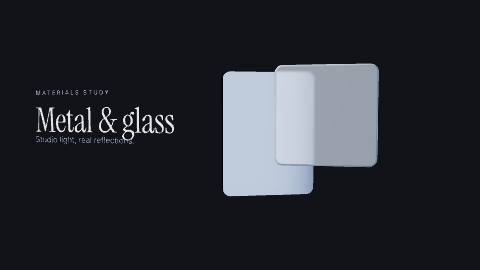
The Chrome & glass hero template: a chrome panel turns behind a milky glass card while studio lights sweep across both

After Effects Alternative for Motion Design

Motion graphics vs VFX

Paraplex vs After Effects

After Effects is the standard for compositing and VFX. Paraplex is for motion graphics in a browser tab: free to start, an assistant that builds the animation, and one scene for every screen.

Verdict, feature table and sources, as of October 2026