Built for whoever has to make it move.

Designers, founders, marketers, agencies and developers each come to motion with a different worry. Paraplex answers all five with one studio: real 3D you can edit, AI that waits for your approval, and one scene for every screen.

Unlimited free 1080p exports.  No watermark.  Runs in your browser.

Find your team.

Five ways in, one studio underneath. Each page names what that team worries about, shows what answers it, and hands over the templates to start from.

Render needed · FR-01

Paraplex for

Founders

No motion designer, and a launch date coming. Start from a sentence or a template, put your real screens on a 3D phone, and export every launch format free at 1080p.

Render needed · FR-03

Paraplex for

Marketers

Every channel wants its own cut. Build one scene, reframe it for 16:9, 9:16, 1:1 and 4:5 with safe zones for each feed, and keep every version on brand with a design system.

Render needed · FR-04

Paraplex for

Agencies

Every client has a brand, and every brand has revisions. Keep each client's colors, fonts and motion as a design system, apply it in one step, and share a link for review.

What every team gets.

Five different worries, the same studio underneath. These hold whichever team you're on.

Real 3D from the first frame.

Every scene is lit by real lights and environments and built from physically based materials like glass and chrome, yet it works like a flat slide until you want depth.

AI you approve, change by change.

The assistant builds with the editor's own layers and keyframes. Every turn is a preview you Apply or Discard, and applied changes undo in one step.

One scene, every screen.

Add 16:9, 9:16, 1:1, 4:5 or 4:3 as artboards beside the frame, each reframed for its shape, with safe zones for TikTok, Reels, Shorts and the Instagram feed.

Your brand in one step.

Keep colors, fonts, text styles, materials, scene looks and motion as a design system, and apply it to any scene at once.

Video, Lottie or a live embed.

Export MP4, WebM, GIF, PNG or Lottie, or publish an embed that plays in real time on your site and answers hover, click and scroll.

Free to start, in your browser.

Nothing to install. Free exports run to 1080p with no watermark, and Pro adds 4K at 60 fps, transparent export and batch export.

Questions from every team

Who is Paraplex for?

Paraplex is a browser-based 3D motion design app for designers, founders, marketers, agencies and developers. Designers use it for motion with real materials and light, founders for launch and demo videos, marketers for social cuts in every format, agencies for on-brand work across clients, and developers to turn HTML, React and GSAP into video or put live 3D on a site.

Do I need motion design or 3D experience?

No. You can start from a sentence and let the assistant build the scene, or open a template made for you to swap in your words, pictures, logo and colors. Most templates face the camera like a flat slide until you want depth, and 2D design mode edits the scene like a flat design tool.

Does the AI change my work without asking?

No. Each turn of the Paraplex assistant is a preview you Apply or Discard, applied changes undo in one step, and everything it makes stays ordinary layers and keyframes you can edit by hand.

Can a team keep every video on brand?

Yes. A Paraplex design system holds a brand's colors, fonts, text styles, materials, scene looks and motion, and applies to any scene in one step. Apply with AI has the assistant restyle a scene in your brand, and a brand kit exports as one file a teammate can import.

Does Paraplex work with code?

Yes. Code layers run live HTML, CSS, JavaScript or a React component on the timeline's clock, so CSS animations and GSAP timelines export frame for frame. A live embed can also be filled in by its host page, layer by name, and switched between light and dark themes.

Is Paraplex free?

Yes. Paraplex has a free plan with 1080p exports and no watermark, and it runs in your browser with nothing to install. Pro starts at $19 a month billed yearly and adds 4K at 60 fps, transparent export and batch export.

Build with Paraplex.

Start free in your browser. Upgrade when your work needs 4K.

Paraplex is a browser-based 3D motion design studio with an AI assistant that edits real layers and keyframes.

01

Describe it.

One or two sentences on this way to start.

Open Paraplex
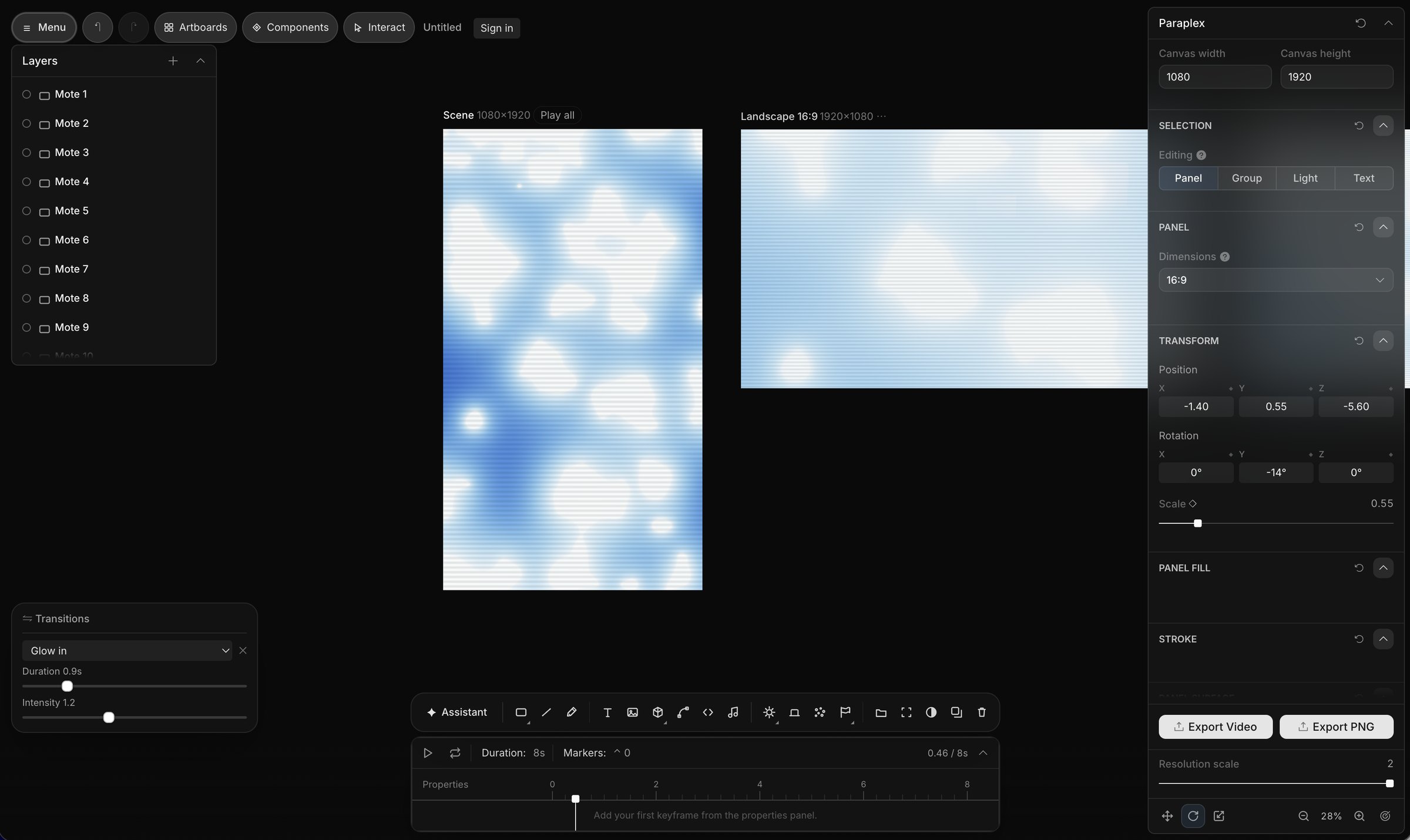
A screenshot depicting artboards in Paraplex, the 3D motion design web app, which allow you to export multiple media formats and sizes with one click, automatically formatted for different social media platforms.

Brand and social

Video ad variations

One version per spreadsheet row: columns fill headlines, prices and photos by layer name, and Export all variants renders them in one job (Pro).

Three ways to start.

Whatever the job, a project starts from words, from a finished template, or from the files you already have. All three open in the same editor, and you can mix them in one scene.

01

Describe it.

Type what you want on the home page and click Make it. The assistant builds the scene from real layers and keyframes, and you Apply or Discard what it made.

Describe a scene

02

Open a template.

62 finished templates in 13 categories, each built for you to swap in your words, pictures, logo, colors, data, music, video or voice.

Browse templates in Paraplex

03

Bring what you have.

Drop screenshots, recordings, GLB models or Lottie files on the canvas, paste an SVG from Figma or HTML and React as a live layer, or upload a CSV for a chart.

Start with a blank scene

One scene, every screen.

Whatever the job, the same scene exports for every place it runs. Add formats as artboards beside your frame, let Responsive framing re-stack blocks for each shape, and pin your logo to its corner. Then export MP4, WebM, a GIF or a Lottie, or publish a live embed for your site.

Export to

5 shapes

16:9, 9:16, 1:1, 4:5 and 4:3, or a custom size

Safe zones for

4 feeds

TikTok, Reels, Shorts and the Instagram feed

Up to

4K at 60 fps

on Pro; free exports run to 1080p, no watermark

16:9

Landscape 16:9 · YouTube, slides and your site

9:16

Vertical 9:16 · Reels, Shorts & TikTok

4:5

Portrait 4:5 · feeds on Instagram, X and LinkedIn