A free After Effects alternative for motion design, not VFX.

After Effects is the industry standard for compositing and visual effects. If what you make is motion graphics, such as launch videos, animated type, charts or a website hero, Paraplex does it in a browser tab: real 3D with physically based light, an AI assistant whose every change you approve, and one scene exported for every screen or as a live embed.

Unlimited free 1080p exports.  No watermark.  Runs in your browser.

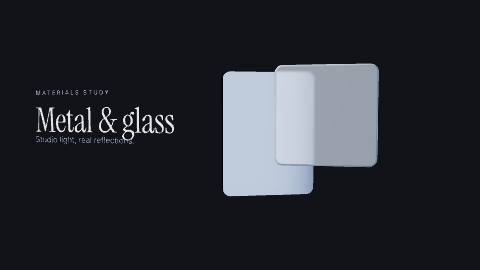
The Chrome & glass hero template: a chrome panel turns behind a milky glass card while studio lights sweep across both and the camera swings around them

The short version.

Paraplex

Choose Paraplex if you need

Motion graphics in a browser tab, with nothing to install and a free plan with no watermark

An AI assistant that builds the animation from real layers and keyframes, with every change previewed before you keep it

Glass, chrome and light that look physically real, with a path-traced Studio render on Pro

One scene reframed for 16:9, 9:16, 1:1 and 4:5 instead of a comp per format

A live, interactive embed for your website, plus Lottie export with no plugin

After Effects

Choose After Effects if you need

Visual effects on filmed footage: keying, tracking and rotoscoping

Pieces longer than a minute, or a Premiere workflow through Dynamic Link

Expressions, scripts and a deep library of third-party plugins

To hand studios and clients the .aep project files they expect

ProRes and broadcast delivery specs

Both

Keyframe timelines with easing curves, 3D layers with lights and cameras, GLB and glTF model import, SVG import, and an AI assistant (in beta in After Effects as of October 2026).

Three differences that change how you work.

After Effects can do more, full stop. These are the places where Paraplex gets a designer or marketer to a finished piece faster, or ships something After Effects doesn't.

01

A browser tab, not a workstation.

As of October 2026, After Effects is a desktop app for Windows 11 or macOS 14 Sonoma and later, with 16 GB of RAM as the minimum, sold as a subscription from US$22.99 a month on an annual plan after a 7-day trial.

Paraplex opens in a browser tab with nothing to install. It saves as you go, syncs your projects to any computer once you sign in, and starts from a sentence, a template or a blank frame. The free plan exports 1080p video with no watermark.

Paraplex

Browser tab; free plan with 1080p exports and no watermark; Pro from $19 a month billed yearly

After Effects

Desktop app for Windows and macOS; from US$22.99 a month on an annual plan, 7-day trial

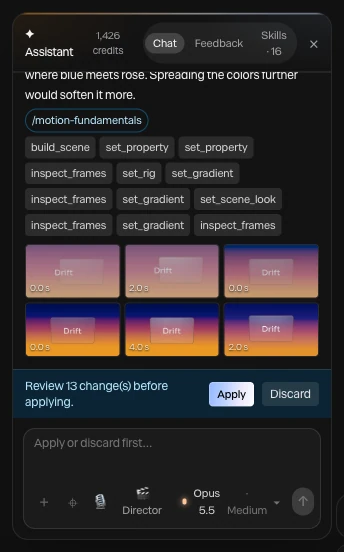
A finished assistant turn in Paraplex: the steps it took as chips, the motion-fundamentals skill it read, six frames it checked, and Review 13 changes before applying with Apply and Discard

Screenshot · a finished turn, waiting for Apply

02

AI that builds the motion, not just the project.

As of October 2026, the After Effects AI Assistant is a beta feature: it organizes projects, writes and fixes expressions, and generates images and video with Adobe Firefly and partner models.

Paraplex's assistant builds the animation itself, with 140 tools across layers, keyframes, camera moves and materials. Every turn is a preview you Apply or Discard, applied changes undo in one step, and what it makes stays ordinary layers and keyframes you can edit by hand.

Paraplex

Builds scenes with 140 tools; every turn a preview you Apply or Discard

After Effects

AI Assistant in beta: organizes projects, writes expressions, generates images and video

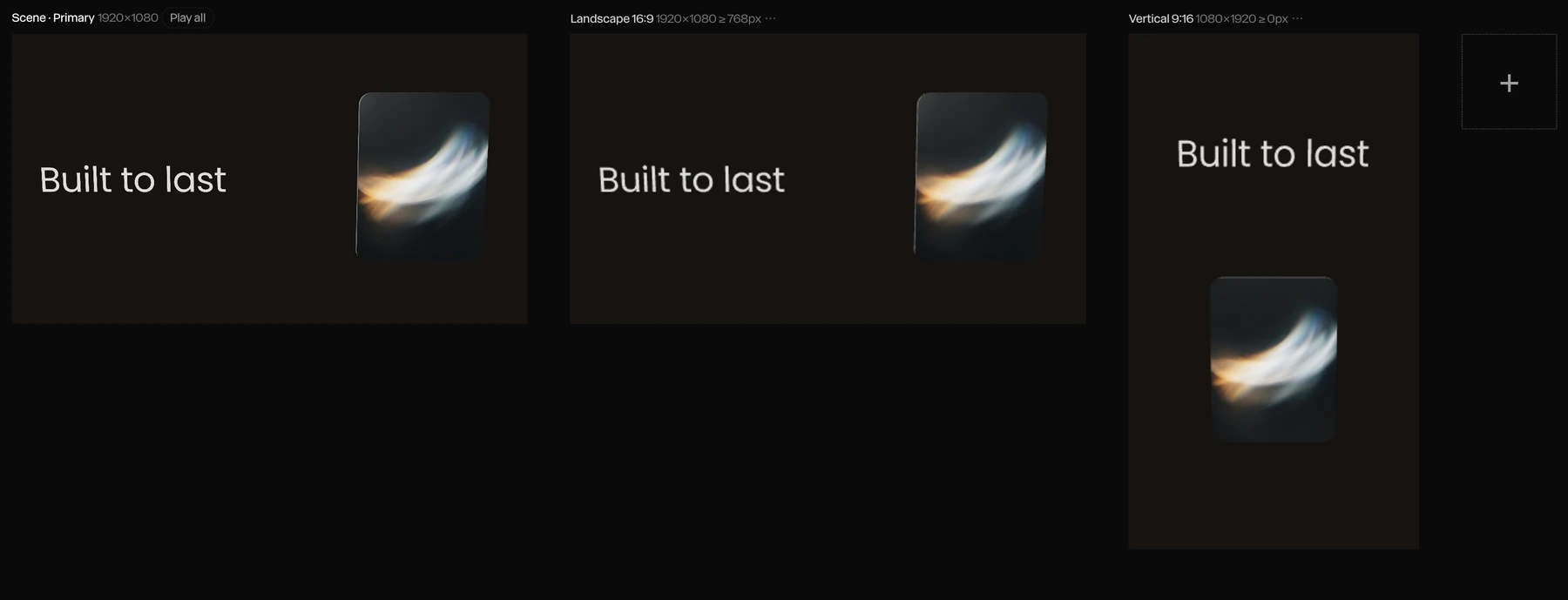
One scene on three artboards in Paraplex: on the primary and the 16:9 artboard the headline Built to last sits beside a glass card, and on the 9:16 artboard it stacks above the card

Screenshot · Responsive re-stacks the 9:16 artboard

03

One scene, every screen, and the web.

Add 9:16, 1:1, 4:5 or 4:3 artboards and the scene reframes itself for each; Responsive framing re-stacks blocks side by side or top to bottom, like a web page. Then export every enabled format in one go.

The same scene can go live as an embed that answers hover, click, drag and scroll, or export as MP4, transparent WebM on Pro, GIF or Lottie, with no plugin to install.

Paraplex

Artboards per format, live web embed, Lottie export built in

After Effects

Usually a comp per format; Lottie through the Bodymovin or LottieFiles plugins

Paraplex vs After Effects, feature by feature

As of October 2026
Paraplex and After Effects compared feature by feature, as of October 2026
ParaplexAfter Effects
Where it runsIn a browser tab, nothing to install; projects sync once you sign inDesktop app for Windows 11 and macOS 14 Sonoma or later; 16 GB of RAM minimum
PriceFree plan with 1080p exports and no watermark; Pro $19/mo billed yearly or $24 month to monthUS$22.99/mo on an annual plan billed monthly, or $34.49 month to month; also in Creative Cloud Pro; 7-day free trial
Built forMotion graphics: launch and demo videos, animated type and charts, website heroes, social postsMotion graphics, compositing and visual effects for film, TV and video
3DEvery scene is real 3D: physically based glass, chrome and metal, lights, HDRI and shadows; path-traced Studio render (Pro)Advanced 3D renderer, parametric meshes and Substance 3D materials (2026); GLB, glTF, OBJ and FBX import; Cinema 4D Lite included
AIAn assistant with 140 tools builds layers, keyframes, camera moves and materials; every turn a preview you Apply or DiscardAI Assistant in beta: organizes projects, writes and fixes expressions, generates images and video with Firefly and partner models
TimelineA keyframe on every setting, 23 easing presets and springs; pieces of 1 to 60 s at 10 to 120 fpsKeyframes, graph editor and JavaScript expressions; compositions well beyond a minute
Footage and VFXMasks, blend modes, adjustment layers and 26 effects; built for motion graphics, not finishing footageKeying, motion tracking, Roto Brush and Object Matte, a large effects library and third-party plugins
Video exportMP4 and WebM; Free 1080p at 30 fps, Pro up to 4K at 60 fpsH.264, ProRes and more through the Render Queue or Adobe Media Encoder
Transparent videoWebM with alpha and PNG sequences (Pro)ProRes 4444 and other formats with alpha
Every aspect ratioArtboards for 16:9, 9:16, 1:1, 4:5 and 4:3 with Responsive framing; export all enabled in one goUsually a separate comp per aspect ratio
Web and LottieLive interactive embed (hover, click, drag, scroll, state machines); Lottie export built inNo live embed; Lottie through the free Bodymovin or LottieFiles plugins
DataCharts from a pasted CSV; one version per spreadsheet row, batch export on ProCSV and JSON files can drive layers through expressions
Review and sharingShareable links, an editable copy by link, notes on the canvas; no real-time co-editingFrame.io for Creative Cloud included for review and approval

Adobe updates After Effects through the year and holds Adobe MAX on November 10 to 12, 2026, so check its release notes for anything newer than October 27, 2026. After Effects does far more with footage; the gaps that favor Paraplex are the browser, the price of entry, AI that builds the animation, and output for the web.

Sources: After Effects plans (Adobe), After Effects system requirements (Adobe), After Effects 26.5 release notes (Adobe), After Effects AI Assistant overview (Adobe), 3D model import in After Effects (Adobe), LottieFiles for After Effects, Paraplex pricing.

When After Effects is the better choice.

After Effects is the industry standard for good reason. As of October 2026, pick it in these cases, or use both: make the motion graphics in Paraplex and bring a transparent PNG sequence (Pro) into your After Effects or Premiere timeline.

Visual effects on real footage.

Keying, motion tracking, Roto Brush and the AI Object Matte tool, layered over filmed shots. Paraplex is built for motion graphics, so finishing live-action footage belongs in After Effects.

Studio and client handoff.

Agencies and post houses trade .aep project files and Motion Graphics templates for Premiere. Paraplex doesn't open or export After Effects projects.

Anything longer than a minute.

Paraplex pieces run 1 to 60 seconds. Longer explainers, title sequences and anything cut alongside Premiere through Dynamic Link belong in After Effects.

Expressions, scripts and plugins.

A deep library of expressions, scripts and third-party plugins on aescripts and Adobe Exchange. Paraplex has code layers and generators you can edit in JavaScript, but no plugin marketplace.

Broadcast and film delivery.

ProRes masters and broadcast delivery specs. Paraplex exports MP4 and WebM, up to 4K at 60 fps on Pro.

You already pay for Creative Cloud.

After Effects comes with Creative Cloud Pro, alongside Premiere, Photoshop and Illustrator. If those are already in your workflow, staying costs nothing extra.

Moving work over from After Effects.

Paraplex doesn't open .aep project files. Bring your work across in open formats instead, then add the light, depth and every-format export.

Lottie, via Bodymovin.

Export a comp with Bodymovin or the LottieFiles plugin, then open the .json or .lottie in Paraplex as native layers with their keyframes and easing. Expressions, effects, masks and mattes don't come through, and Paraplex lists them instead of dropping them silently.

SVG and Illustrator art.

Paste SVG from Illustrator, Figma or a code editor, and every shape arrives as an editable vector path you can give depth, a material and motion.

3D models and fonts.

Bring GLB and glTF models from Blender or Cinema 4D, and upload your TTF or OTF fonts once; they're saved inside the project.

Rendered footage.

Drop in MP4 or WebM clips you rendered from After Effects. They play on Paraplex's timeline, on a flat layer, a 3D card or a device screen.

Other After Effects alternatives.

Paraplex isn't the only option. If your work leans a different way, these are worth a look, as of October 2026.

Best free option for compositing

DaVinci Resolve (Fusion)

Blackmagic Design's free editor includes Fusion, a node-based compositor for visual effects and motion graphics, on Mac, Windows and Linux.

Best for Final Cut Pro users

Apple Motion

A Mac app for 2D and 3D titles, transitions and effects that publish to Final Cut Pro, sold once for US$49.99 on the Mac App Store.

Best for procedural 2D motion

Cavalry

A desktop app for Mac and Windows built on procedural, data-driven animation, with a free Starter plan.

Best for quick 2D motion in a browser

Jitter

A browser-based 2D motion tool with a large template library, real-time team editing and a free plan.

Best for full 3D, free

Blender

Free, open-source 3D modeling, animation and rendering with a built-in compositor; a steeper climb if you only need motion graphics.

Questions about Paraplex and After Effects

What is the best After Effects alternative for motion graphics?

It depends on the job. As of October 2026, Paraplex is a browser-based After Effects alternative for motion graphics, such as launch videos, animated type, charts and website heroes, with real 3D light, an AI assistant whose changes you approve, and a free plan. For visual effects and compositing on footage, After Effects remains the stronger tool, and DaVinci Resolve's Fusion is the main free alternative.

Is there a free After Effects alternative?

Yes. Paraplex's free plan includes the whole editor and exports video up to 1080p at 30 fps with no watermark, with 100 AI credits a month. Pro costs $19 a month billed yearly or $24 month to month and adds 4K at 60 fps, transparent video, batch export, Studio render and 1,500 AI credits a month. As of October 2026, After Effects offers a 7-day free trial, then costs US$22.99 a month on an annual plan.

Does Paraplex run in the browser?

Yes. Paraplex runs in a browser tab with nothing to install, saves your work as you go, and syncs your projects to any computer once you sign in. After Effects is a desktop app for Windows and macOS.

Can Paraplex open After Effects project files?

No. Paraplex doesn't open .aep files. Export a Lottie from After Effects with Bodymovin or the LottieFiles plugin and Paraplex opens it as native layers with their keyframes and easing; it also takes SVG, GLB and glTF models, TTF and OTF fonts, and rendered video.

How is Paraplex's AI different from the After Effects AI Assistant?

As of October 2026, the After Effects AI Assistant is a beta feature that organizes projects, writes and fixes expressions, and generates images and video with Adobe Firefly and partner models. Paraplex's assistant builds and edits the animation itself with 140 tools across layers, keyframes, camera moves and materials, shows every turn as a preview you Apply or Discard, and can storyboard a plan first in Director mode.

Can Paraplex do VFX and compositing like After Effects?

Not the way After Effects does. Paraplex is built for motion graphics rather than visual effects on filmed footage, so keying, motion tracking and rotoscoping belong in After Effects or DaVinci Resolve's Fusion. Paraplex can put rendered footage on 3D cards and device screens, and export transparent video (Pro) for compositing elsewhere.

Does After Effects have real 3D?

Yes, more than it used to. As of October 2026, After Effects has an Advanced 3D renderer, native parametric meshes, Substance 3D materials and GLB import, and includes Cinema 4D Lite. Every Paraplex scene is real 3D with physically based glass, chrome and metal, lights, HDRI environments and shadows, plus a path-traced Studio render on Pro, while still editing like a flat design tool in 2D mode.

Build with Paraplex.

Start free in your browser. Upgrade when your work needs 4K.

Paraplex is a browser-based 3D motion design studio with an AI assistant that edits real layers and keyframes.

Point title.

One or two sentences.

Section heading.

One or two sentences on what this list covers.

The short version.

Paraplex

Choose Paraplex if you need

First reason

Second reason

Third reason

Competitor

Choose the competitor if you need

First reason

Second reason

Third reason

Both

What the two tools share.

Where they differ.

One or two sentences that frame the differences.

01

Difference title.

Two or three sentences on the difference.

Paraplex

What Paraplex does.

Competitor

What the competitor does.

Paraplex and Jitter compared feature by feature, as of October 2026
ParaplexJitter
3DReal 3D scenes: physically based glass, chrome and metal, lights, HDRI and shadows; path-traced Studio render (Pro); GLB and glTF importNo native 3D scenes; 3D flip effects and AI-built 3D rotations on flat layers
GlassLiquid glass with 10 keyframeable dials, inside a lit 3D sceneAn animatable 2D glass effect with refraction, depth, dispersion, frost and light controls (May 2026)
AIAn assistant with 140 tools edits layers, keyframes, camera and materials; every turn is a preview you Apply or Discard; Director mode storyboards firstJitter AI and Superagents edit layers on the canvas, in Balanced (Claude Sonnet 5.5) or Smart (Claude Opus 5.5) mode; Jitter MCP in beta since October 20, 2026
TimelineKeyframe timeline with a diamond on every setting, 23 easing presets and springs; pieces of 1 to 60 s at 10 to 120 fpsAction-based timeline with no keyframes required; easing presets and custom curves
Video exportFree: 1080p at 30 fps, no watermark. Pro: 4K at 60 fpsFree: 720p at 30 fps, with a watermark. Pro: 1080p at 60 fps. Max and Ultra: 4K at 120 fps
FormatsMP4, WebM, GIF, PNG, Lottie (flat layers), USDZ and a live web embedMP4, MOV, WebM, GIF and Lottie; ProRes on Pro and up
Transparent videoWebM with alpha and PNG sequences, on ProProRes 4444 and WebM, on Max and up
Data and variantsCharts from a pasted CSV; one version per spreadsheet row, columns matched to layers by name; every format and variant in one batch on ProBulk Create from a CSV for text and image swaps (July 2026); chart templates; batch export on Max and up
Live web embedInteractive embed with hover, click, drag, scroll, state machines, breakpoints and an embed APINot listed; exports video, GIF and Lottie
Templates77 in 13 categories300+
CollaborationNo real-time co-editing yet; shareable links, links to an editable copy and notes on the canvasReal-time co-editing and comments in a shared workspace; up to 10 editors on Pro and 50 on Max
FigmaPaste SVG from Figma as editable vector paths; import design tokens from Figma variable exportsFigma plugin used by more than 300,000 designers
PriceFree plan; Pro $19/mo billed yearly or $24 month to monthFree plan; Pro, Max and Ultra are billed per editor (prices at jitter.video/pricing)
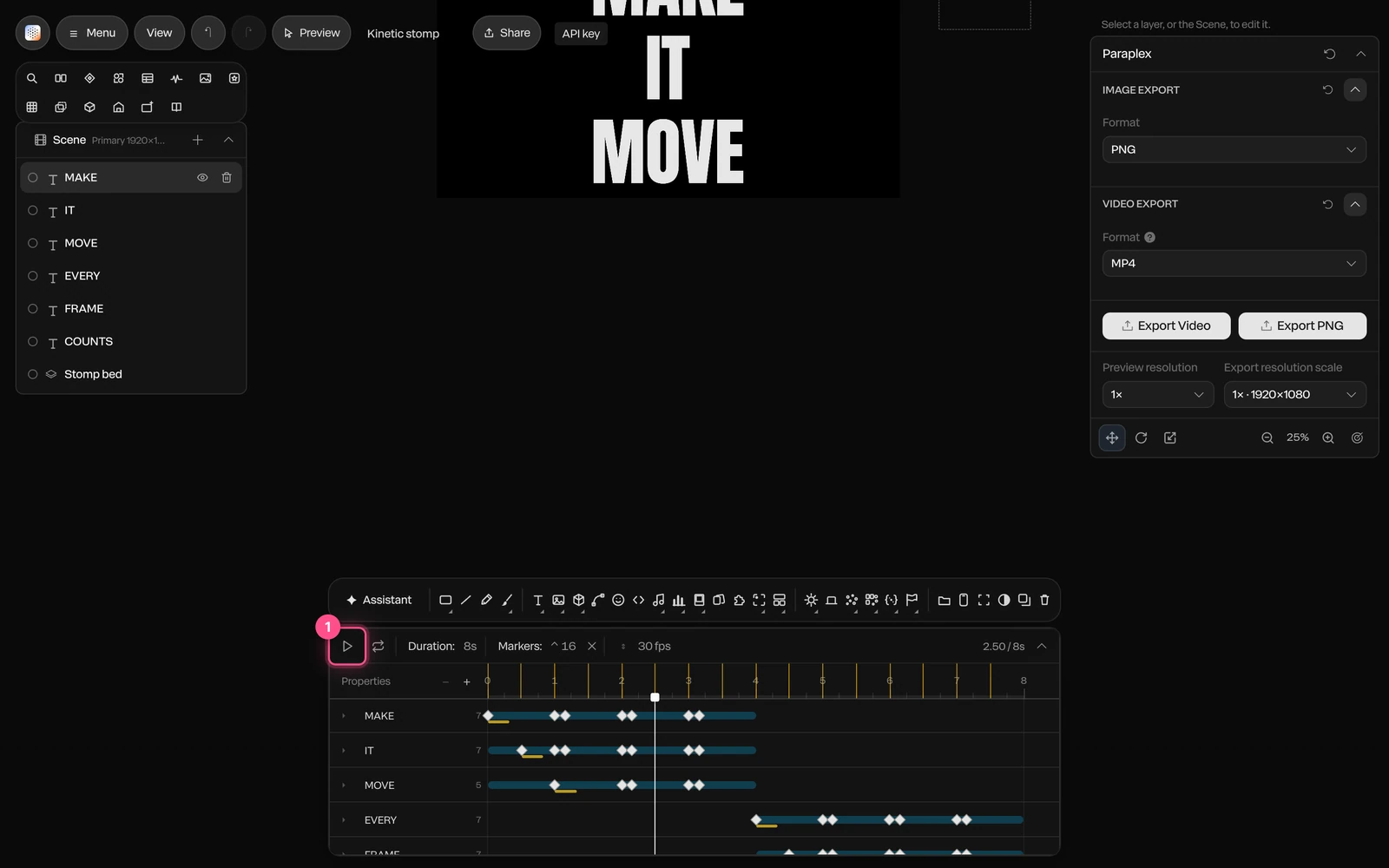
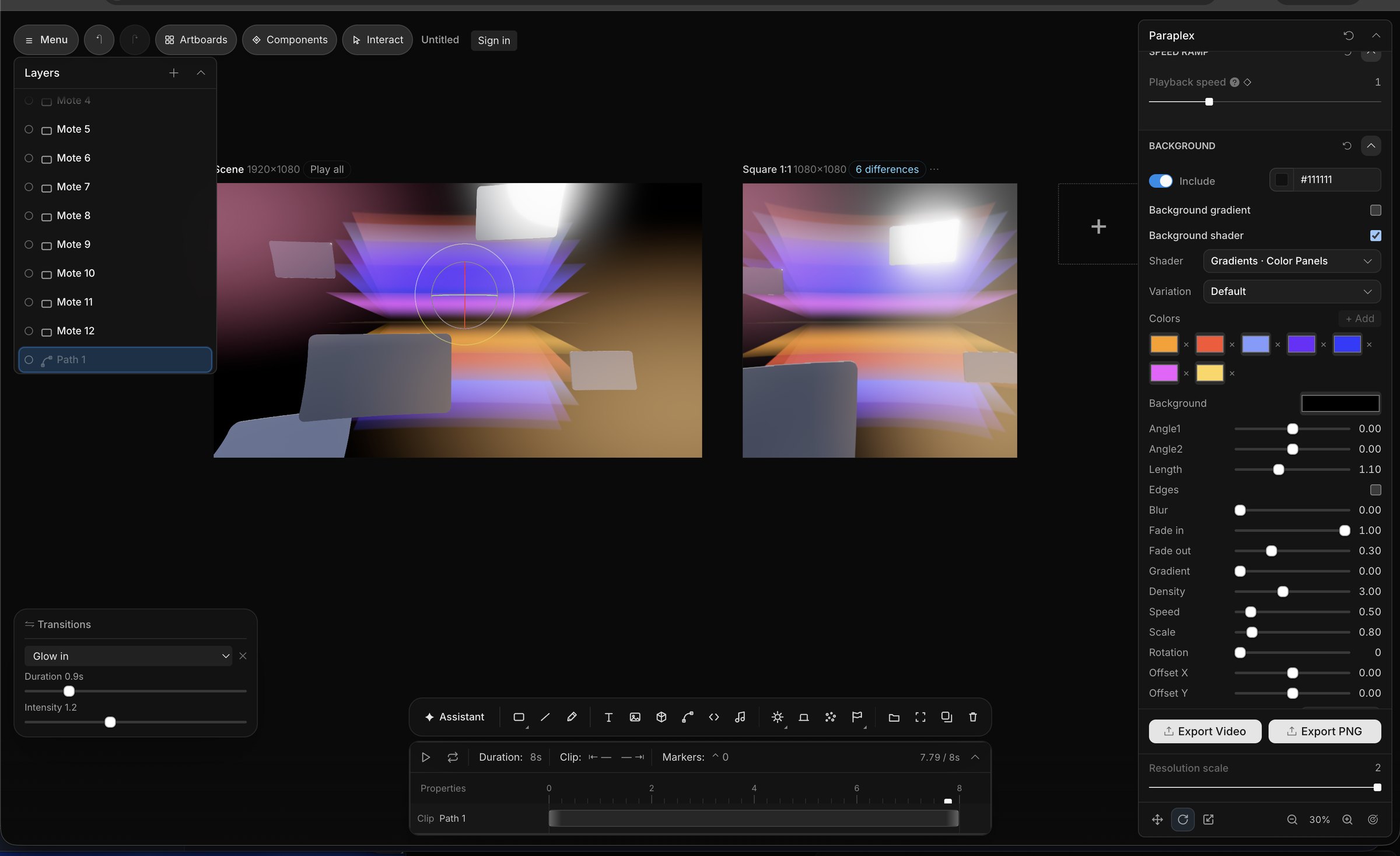
Screenshot of the editor interface for Paraplex, a 3D motion design app, featuring a timeline, panels with editable sliders and settings for things like glass material refraction, dispersion, IOR, transmission, and other panels like a layers panel and transitions panel and gradient settings with animated keyframes.
Screenshot of AI motion design in the Paraplex app, showcasing the built-in AI assistant producing fully editable outputs that the user can configure in the Paraplex app's UI, and easily make fully 3D scenes from scratch using agentic AI workflows.
A screenshot of the UI from the Paraplex app, displaying a series of sliders and settings used to build 3D motion graphics in the browser, including abstract meta blobs and liquid glass shapes
Paraplex and Jitter compared feature by feature, as of October 2026
ParaplexJitter
3DReal 3D scenes: physically based glass, chrome and metal, lights, HDRI and shadows; path-traced Studio render (Pro); GLB and glTF importNo native 3D scenes; 3D flip effects and AI-built 3D rotations on flat layers
GlassLiquid glass with 10 keyframeable dials, inside a lit 3D sceneAn animatable 2D glass effect with refraction, depth, dispersion, frost and light controls (May 2026)
AIAn assistant with 140 tools edits layers, keyframes, camera and materials; every turn is a preview you Apply or Discard; Director mode storyboards firstJitter AI and Superagents edit layers on the canvas, in Balanced (Claude Sonnet 5.5) or Smart (Claude Opus 5.5) mode; Jitter MCP in beta since October 20, 2026
TimelineKeyframe timeline with a diamond on every setting, 23 easing presets and springs; pieces of 1 to 60 s at 10 to 120 fpsAction-based timeline with no keyframes required; easing presets and custom curves
Video exportFree: 1080p at 30 fps, no watermark. Pro: 4K at 60 fpsFree: 720p at 30 fps, with a watermark. Pro: 1080p at 60 fps. Max and Ultra: 4K at 120 fps
FormatsMP4, WebM, GIF, PNG, Lottie (flat layers), USDZ and a live web embedMP4, MOV, WebM, GIF and Lottie; ProRes on Pro and up
Transparent videoWebM with alpha and PNG sequences, on ProProRes 4444 and WebM, on Max and up
Data and variantsCharts from a pasted CSV; one version per spreadsheet row, columns matched to layers by name; every format and variant in one batch on ProBulk Create from a CSV for text and image swaps (July 2026); chart templates; batch export on Max and up
Live web embedInteractive embed with hover, click, drag, scroll, state machines, breakpoints and an embed APINot listed; exports video, GIF and Lottie
Templates77 in 13 categories300+
CollaborationNo real-time co-editing yet; shareable links, links to an editable copy and notes on the canvasReal-time co-editing and comments in a shared workspace; up to 10 editors on Pro and 50 on Max
FigmaPaste SVG from Figma as editable vector paths; import design tokens from Figma variable exportsFigma plugin used by more than 300,000 designers
PriceFree plan; Pro $19/mo billed yearly or $24 month to monthFree plan; Pro, Max and Ultra are billed per editor (prices at jitter.video/pricing)